

A show password as text toggle for Bootstrap forms
- Native-looking UI
- Vanilla JavaScript with no dependencies (but jQuery version included to support older browsers)
- Base64 encoded SVG icons (no external images or fonts required)
- Graceful fallback for browsers with JavaScript disabled
- Works with Bootstrap 4 and 5
- Only 1KB gzipped
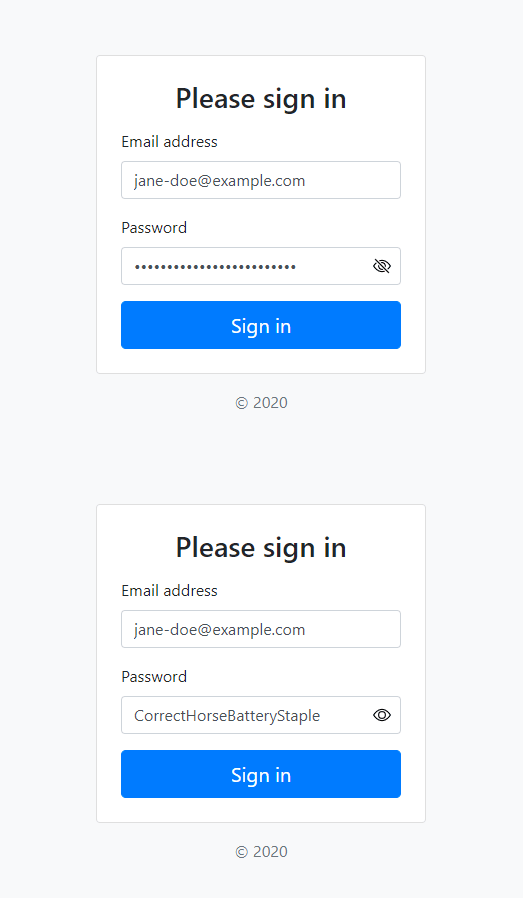
- Download the latest release
- Clone the repo
git clone https://github.com/slackero/bootstrap-show-password-toggle.git - Install with npm
npm i @slackero/bootstrap-show-password-toggle
-
Include the
show-password-toggle.cssin your CSS -
Wrap the password input in an
input-groupdiv as follows:
<div class="input-group">
  <input type="password"
         class="form-control rounded"
         required
         data-show="Show password as plain text."
         data-hide="Hide password."
  >
</div>- Load the
show-password-toggle.min.jsafter the form. Load the jQuery related versionshow-password-toggle-jquery.min.jsinstead if also older browsers should be supported.
I highly recommend adding the attributes: spellcheck="false" and autocapitalize="off" to the password input so that when the password is displayed in plain text the input is not auto-corrected, capitalized or spellchecked (to avoid red squiggly line underneath).
You should also add id="current-password" and autocomplete="current-password" to help browsers autocomplete the form.
Works well with all the browsers supported by Bootstrap
Q. Can I change the show password icon?
A. You could change the icon displayed by replacing the .input-password[type="password"] Base64 encoded background image. SVG is recommended.
- For browsers without Element.after() load
show-password-toggle-jquery.min.jsinstead. jQuery or Cash needs to be loaded before.
- MDO and Bootstrap team for the icons
- Sam Dutton at Google for the idea and initial JavaScript from the 'Sign-in form Best Practises' article