GitOps
GitOps is a modern approach to managing infrastructure and applications using Git as the single source of truth. It leverages Git repositories to store declarative configurations, enabling automated and reliable deployments.
-
Declarative Configuration:
All infrastructure and application configurations are defined declaratively (e.g., YAML files). -
Version Control:
Git serves as the single source of truth, ensuring that all changes are tracked and auditable. -
Automation:
Changes to the Git repository trigger automated processes to apply the desired state to the system. -
Continuous Reconciliation:
A GitOps agent continuously monitors the system's state and reconciles it with the desired state defined in Git.
-
Improved Collaboration:
Teams can collaborate effectively using Git's branching, pull requests, and code review features. -
Auditability:
Every change is version-controlled, providing a clear history of modifications. -
Reliability:
Automated deployments reduce the risk of human error and ensure consistency. -
Faster Rollbacks:
Reverting to a previous state is as simple as rolling back to an earlier Git commit. -
Scalability:
GitOps workflows can scale with the size and complexity of the infrastructure.
-
Define the Desired State:
- Use declarative configuration files (e.g., Kubernetes manifests, Terraform files) to define the desired state of the system.
- Store these files in a Git repository.
-
Push Changes to Git:
- Developers or operators make changes to the configuration files and push them to the repository.
-
Trigger Automation:
- A GitOps agent (e.g., Flux, ArgoCD) detects changes in the repository and applies them to the system.
-
Continuous Reconciliation:
- The GitOps agent continuously monitors the system's state and ensures it matches the desired state in Git.
-
Monitor and Validate:
- Use monitoring tools to validate that the system is functioning as expected after changes.
-
Use Declarative Configurations:
- Ensure all configurations are declarative and stored in Git.
-
Implement Access Controls:
- Restrict access to the Git repository to authorized users only.
-
Automate Testing:
- Use CI/CD pipelines to validate configuration changes before they are applied.
-
Monitor Drift:
- Continuously monitor for drift between the desired state in Git and the actual state of the system.
-
Document Processes:
- Maintain clear documentation for GitOps workflows and practices.
-
Flux:
- A GitOps tool for Kubernetes that automates deployments and synchronizes the cluster state with Git.
-
ArgoCD:
- A declarative GitOps tool for Kubernetes that provides a web UI for managing applications.
-
Terraform:
- While not strictly a GitOps tool, Terraform can be used in GitOps workflows for managing infrastructure.
-
Jenkins X:
- A CI/CD platform that integrates GitOps principles for Kubernetes-based applications.
-
Set Up a Git Repository:
- Create a repository to store your configuration files.
-
Choose a GitOps Tool:
- Select a tool like Flux or ArgoCD based on your requirements.
-
Define Configurations:
- Write declarative configuration files for your infrastructure and applications.
-
Automate Deployments:
- Configure the GitOps tool to monitor the repository and apply changes automatically.
-
Monitor and Iterate:
- Continuously monitor the system and refine your GitOps workflows.
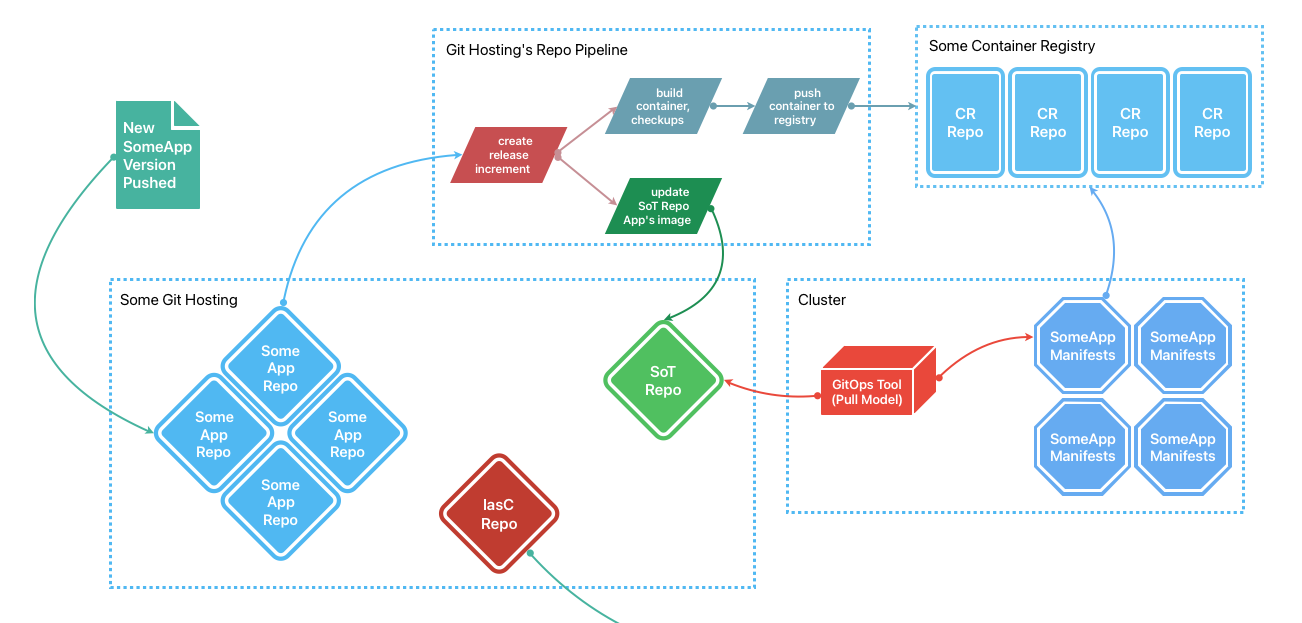
To streamline GitOps workflows, you can set up CI pipelines in each repository that:
-
Builds the Container:
- The CI pipeline compiles the application and builds a container image.
-
Publishes the Container:
- The built container image is pushed to a container registry (e.g., Docker Hub, Amazon ECR, or Google Container Registry).
-
Updates the GitOps Repository:
- The pipeline invokes a reusable job or composite action that:
- Authenticates with the GitOps repository using a secure key.
- Updates the image version in the GitOps repository under the path
{stateRepoName}/apps/{currentRepoName}/deploy.yaml.
- The pipeline invokes a reusable job or composite action that:
-
Triggers Cluster Reconciliation:
- Tools like ArgoCD monitor the GitOps repository for changes, compare the actual state of the cluster with the desired state, and apply updates to bring the cluster to the desired state.
-
Avoid Storing Sensitive Data in GitOps Repositories:
- Do not store sensitive information (e.g., secrets, credentials) directly in the GitOps repository. Use secret management tools like HashiCorp Vault, AWS Secrets Manager, or Kubernetes Secrets.
-
Secure Access to CI/CD Pipelines:
- Ensure that access to CI/CD pipelines and the GitOps repository is restricted to authorized users and processes.
-
Use Immutable Container Images:
- Tag container images with unique, immutable identifiers (e.g., SHA256 digests) to ensure reproducibility and prevent accidental overwrites.
GitOps combined with CI/CD pipelines provides a robust and automated approach to managing infrastructure and applications. By following these practices, teams can achieve faster deployments, improved security, and greater operational efficiency.
GitOps is a powerful methodology that simplifies infrastructure and application management while promoting collaboration, reliability, and scalability. By adopting GitOps, teams can achieve faster deployments, improved stability, and greater confidence in their systems.