
Install the Docker software by following the installation instructions on the Docker website.
Check the network for existent:
docker network ls | grep opflow-dev-netCreate the network opflow-dev-net:
docker network create opflow-dev-netdocker run -d \
--network=opflow-dev-net \
--name opflow-rabbitmq-server \
--hostname opflow-rabbitmq-server \
-p 5672:5672 \
-p 15672:15672 \
-e RABBITMQ_DEFAULT_USER=giong \
-e RABBITMQ_DEFAULT_PASS=qwerty \
rabbitmq:3-managementThe connection for business flow:
- User: opuser, password: qwerty;
- Virtual host (vHost): opflow;
- Set full permissions for the user
opuserto the vHostopflow;
The connection for logging flow:
- User: logger, password: qwerty;
- Virtual host (vHost): oplogs;
- Set full permissions for the user
loggerto the vHostoplogs;
Enable snapshots in repository config (~/.m2/settings.xml):
<settings>
  <profiles>
    <profile>
      <repositories>
        <repository>
          <id>oss.sonatype.org-snapshot</id>
          <url>http://oss.sonatype.org/content/repositories/snapshots</url>
          <releases>
            <enabled>false</enabled>
          </releases>
          <snapshots>
            <enabled>true</enabled>
          </snapshots>
        </repository>
      </repositories>
    </profile>
  </profiles>
</settings>Start the master module of the example from the docker image:
docker run -it --rm \
  -p 8888:8888 \
  -p 8989:8989 \
  --network=opflow-dev-net \
  --name=opflow-java-sample-master \
  opwire/opflow-java-sample-master:latest java \
    -Dlog4j.configuration=file:/app/config/log4j.properties \
    -Dlog4j.appender.opflowAMQP.enabled=true \
    -Dlog4j.appender.opflowAMQP.host=opflow-rabbitmq-server \
    -Dlog4j.appender.opflowAMQP.username=logger \
    -Dlog4j.appender.opflowAMQP.password=qwerty \
    -Dlog4j.appender.opflowAMQP.virtualHost=oplogs \
    -Dopflow.configuration=file:/app/config/master.properties \
    -Dopflow.commander.host=opflow-rabbitmq-server \
    -Dopflow.commander.username=opuser \
    -Dopflow.commander.password=qwerty \
    -Dopflow.commander.virtualHost=opflow \
    -Dopflow.commander.applicationId=FibonacciGenerator \
    -Dopflow.commander.speedMeter.active=true \
    -Dopflow.commander.speedMeter.interval=3000 \
    -Dopflow.commander.speedMeter.length=10 \
    -Dopflow.commander.rpcWatcher.enabled=false \
    -Dopflow.commander.rpcWatcher.interval=5000 \
-jar /app/opflow-java-sample-master.jarFor the workers:
docker run -it --rm \
  --network=opflow-dev-net \
  --name=opflow-java-sample-worker \
  opwire/opflow-java-sample-worker:latest java \
    -Dlog4j.configuration=file:/app/config/log4j.properties \
    -Dlog4j.appender.opflowAMQP.enabled=true \
    -Dlog4j.appender.opflowAMQP.host=opflow-rabbitmq-server \
    -Dlog4j.appender.opflowAMQP.username=logger \
    -Dlog4j.appender.opflowAMQP.password=qwerty \
    -Dlog4j.appender.opflowAMQP.virtualHost=oplogs \
    -Dopflow.configuration=file:/app/config/worker.properties \
    -Dopflow.serverlet.host=opflow-rabbitmq-server \
    -Dopflow.serverlet.username=opuser \
    -Dopflow.serverlet.password=qwerty \
    -Dopflow.serverlet.virtualHost=opflow \
    -Dopflow.serverlet.applicationId=FibonacciGenerator \
-jar /app/opflow-java-sample-worker.jarClone the opflow-core source code from github:
git clone https://github.com/opflow/opflow-java.git
cd opflow-java
Compile and install the package:
mvn clean installClone source code from github:
git clone https://github.com/opflow/opflow-java-sample.git
cd opflow-java-sampleBuild and install the opflow-java-sample-fib-api.jar and opflow-java-sample-fib-api-tests.jar into the local repository:
cd fib-api
mvn clean install
cd ../
Build and install the opflow-java-sample-fib-impl.jar into the local repository:
cd fib-impl
mvn clean install
cd ../
Open a new terminal and change to opflow-java-sample/worker directory.
Update the rabbitmq connection parameters in src/main/resources/worker.properties:
opflow.serverlet.host=opflow-rabbitmq-server
# ...
With the encrypted password:
export OPFLOW_SERVERLET_AMQPWORKER_PASSWORD=$(cat <<EOF
\$ANSIBLE_VAULT;1.1;AES256
37643663313636313239313266633633363065333338333339363736626139376330633233656334
6139396436646133613538323937353963646634393136380a333137333065343331656139366238
32346238333965366330393139366235323162353131363335643762663034393937646664353733
3831333236626335630a313937373937363866303034333765633361393138623030646338336230
3963
EOF
)
export JAVA_SECRET_VAULT_PASSWORD_FILE=$PWD/target/classes/passwd.txtCompile opflow-java-sample-worker and start the worker (worker):
mvn clean compile exec:java -Pworker -Dfibonacci.calc.delay.min=5 -Dfibonacci.calc.delay.max=10Open a new terminal and change to opflow-java-sample/master directory.
Update the rabbitmq connection parameters in src/main/resources/master.properties:
opflow.commander.host=opflow-rabbitmq-server
# ...
With the encrypted password:
export OPFLOW_COMMANDER_AMQPMASTER_PASSWORD=$(cat <<EOF
\$ANSIBLE_VAULT;1.1;AES256
37643663313636313239313266633633363065333338333339363736626139376330633233656334
6139396436646133613538323937353963646634393136380a333137333065343331656139366238
32346238333965366330393139366235323162353131363335643762663034393937646664353733
3831333236626335630a313937373937363866303034333765633361393138623030646338336230
3963
EOF
)
export JAVA_SECRET_VAULT_PASSWORD_FILE=$PWD/target/classes/passwd.txtCompile opflow-java-sample-master and start the web service on master:
mvn clean compile exec:java -Pmaster
Open the web browser and make a HTTP request to http://localhost:8989/ping:
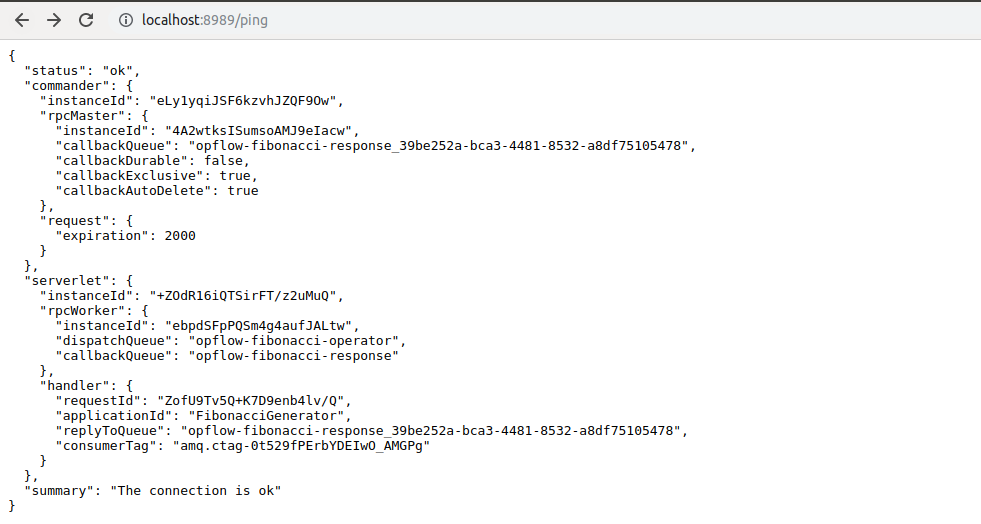
Calculate the fibonacci of a number with url http://localhost:8888/fibonacci/29:

Compiles source code and installs dependencies:
mvn compileInvokes maven to run unit tests:
mvn clean testCompiles source code and installs dependencies:
mvn compileInvokes maven to run integration tests:
mvn clean verifyPacking and assembling program and dependencies into jar package:
mvn clean package -PbundleCopies and customizes log4j.properties and opflow.properties files:
cp src/main/resources/*.properties ~/Opens and edit properties files if necessary to change.
Execute worker:
bash fibonacci --process workerMake a request Fibonacci(38):
bash fibonacci -p master -r request -n 38Calculate Fibonacci for 1000 random numbers in a range [20, 40]:
bash fibonacci -p master -r random --total 1000 --range 20,40