




Autolayout and View Animation Helper for Swift 3.0. Mimimum requirements: Swift 3 and IOS 9 Supported: IOS and Apple TV
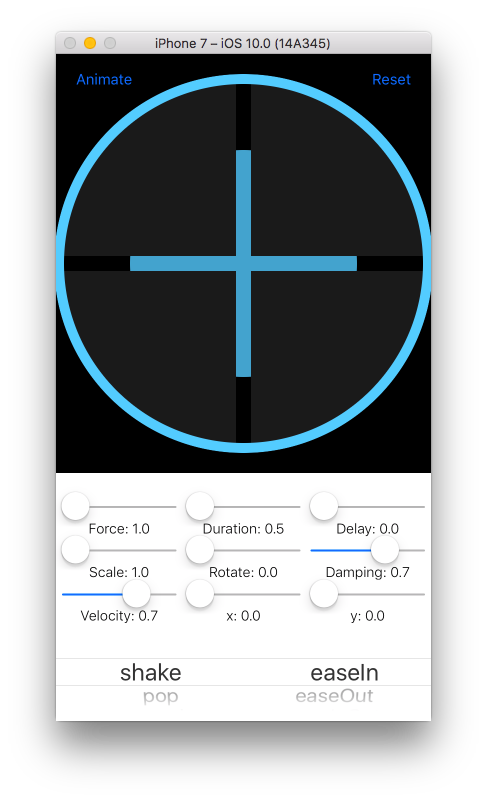
// Required
view.animate(.Shake, curve: .EaseInOutBack)
// With optionals
view.animate(.Shake, curve: .EaseInOutBack, duration: 0.8, delay: 0, force: 1, damping: 0.7,velocity: 1, fromRotation: 0, fromScale: 1.5, fromX: 0, fromY: 0)let box = UIView(autoLayout:true)
view.addSubview(box)
box.backgroundColor = UIColor.redColor()
box.width(100)
box.height(100)
box.center(to: view)
view.layoutIfNeeded()100 pixel view pinned to the center of another view
view.width(100).height(100).center(to: view)view.horizontalCompressionPriority(UILayoutPriorityDefaultHigh)
view.horizontalHuggingPriority(UILayoutPriorityDefaultLow)You can have access to the NSLayoutConstraints by using pin() or applyAttribute.
// Pinning to an item
let widthConstraint = view.pin(.Width, to: view, attribute: .Height, constant: 0, multiplier: 0.5, relation: .LessThanOrEqual)
// Applying an attribute
let widthConstraint = view.applyAttribute(.Width, constant: 100, multiplier: 0.5, relation: .Equal)If a view is already in place with frames, prepForAutoLayout() will remove it from view, enable Auto Layout and place back in view.
view.prepForAutoLayout()If a view uses auto layout but you need to animate it using frames, prepForAnimation() will remove from view, disable auto layout and place back in view.
view.prepForAnimation()Instantiates a new UIView with Auto Layout
convenience init(autoLayout: Bool = true)Returns the frame's origin
origin() -> CGPointPins the frame's top and left sides using Auto Layout or frames
origin(constant: CGPoint) -> UIViewPins left and top sides to another view using Auto Layout
origin(to to:AnyObject, constant: CGPoint = CGPoint(x: 0, y: 0), multiplier:CGFloat = 1) -> UIViewReturns the min x point
left() -> CGFloatPins the left side using Auto Layout or frames
left(constant: CGFloat) -> UIViewPins left side to another view using Auto Layout
left(to to:AnyObject, attribute: NSLayoutAttribute = .Left, constant: CGFloat = 0, multiplier:CGFloat = 1) -> UIViewReturns the leading side value
leading() -> CGFloatPins the leading side using Auto Layout or frames
leading(constant: CGFloat) -> UIViewPins the leading side to another view using Auto Layout
leading(to to:AnyObject, attribute: NSLayoutAttribute = .Leading, constant: CGFloat = 0, multiplier:CGFloat = 1) -> UIViewReturns the max x point
right() -> CGFloatPins the right side using Auto Layout or frames
right(constant: CGFloat) -> UIViewPins the right side to another view using Auto Layout
right(to to:AnyObject, attribute: NSLayoutAttribute = .Right, constant: CGFloat = 0, multiplier:CGFloat = 1) -> UIViewReturns the trailing side value
trailing() -> CGFloatPins the trailing side using Auto Layout or frames
trailing(constant: CGFloat) -> UIViewPins the trailing side to another view using Auto Layout
trailing(to to:AnyObject, attribute: NSLayoutAttribute = .Trailing, constant: CGFloat = 0, multiplier:CGFloat = 1) -> UIViewReturns the top side value
top() -> CGFloatPins the top side using Auto Layout or frames
top(constant: CGFloat) -> UIViewPins the trailing side to another view using Auto Layout
top(to to:AnyObject, attribute: NSLayoutAttribute = .Top, constant: CGFloat = 0, multiplier:CGFloat = 1) -> UIViewReturns the bottom side value
bottom() -> CGFloatPins the bottom side using Auto Layout or frames
bottom(constant: CGFloat) -> UIViewPins the bottom side to another view using Auto Layout
bottom(to to:AnyObject, attribute: NSLayoutAttribute = .Bottom, constant: CGFloat = 0, multiplier:CGFloat = 1) -> UIViewPins the center to it's superview using Auto Layout or frames
center(constant: CGPoint = CGPoint(x: 0, y: 0)) -> UIViewPins the center point to another view using Auto Layout
center(to to:AnyObject, constant:CGSize = CGSize(width: 0, height: 0), multiplier:CGFloat = 1) -> UIViewReturns the center X
centerX() -> CGFloatPins the center X using Auto Layout or frames
centerX(constant: CGFloat = 0) -> UIViewPins the center X to another view using Auto Layout
centerX(to to:AnyObject, attribute: NSLayoutAttribute = .CenterX, constant: CGFloat = 0, multiplier:CGFloat = 1) -> UIViewReturns the center Y
centerY() -> CGFloatPins the center Y using Auto Layout or frames
centerY(constant: CGFloat = 0) -> UIViewPins the center Y to another view using Auto Layout
centerY(to to:AnyObject, attribute: NSLayoutAttribute = .CenterY, constant: CGFloat = 0, multiplier:CGFloat = 1) -> UIViewReturns the Compression Resistance Priority for Horizontal Axis using Auto Layout
horizontalCompressionPriority() -> UILayoutPrioritySets the Compression Resistance Priority for Horizontal Axis using Auto Layout
horizontalCompressionPriority(priority: UILayoutPriority) -> UIViewReturns the Compression Resistance Priority for Vertical Axis using Auto Layout
verticalCompressionPriority() -> UILayoutPrioritySets the Compression Resistance Priority for Vertical Axis using Auto Layout
verticalCompressionPriority(priority: UILayoutPriority) -> UIViewReturns the Content Hugging Priority for Horizontal Axis using Auto Layout
func horizontalHuggingPriority() -> UILayoutPrioritySets the Content Hugging Priority for Horizontal Axis using Auto Layout
horizontalHuggingPriority(priority: UILayoutPriority) -> UIViewReturns the Content Hugging Priority for Vertical Axis using Auto Layout
verticalHuggingPriority() -> UILayoutPrioritySets the Content Hugging Priority for Vertical Axis using Auto Layout
verticalHuggingPriority(priority: UILayoutPriority) -> UIViewReturns the frame size
size() -> CGSizeSets the frame size using Auto Layout or frames
size(constant: CGSize) -> UIViewPins the size to another view using Auto Layout
size(to to:AnyObject, constant: CGSize = CGSize(width: 0, height: 0), multiplier:CGFloat = 1) -> UIViewReturns the frame width
width() -> CGFloatSets the frame width using Auto Layout or frames
width(constant: CGFloat) -> UIViewPins the width to another view using Auto Layout
width(to to:AnyObject, attribute: NSLayoutAttribute = .Width, constant: CGFloat = 0, multiplier:CGFloat = 1) -> UIViewReturns the frame height
height() -> CGFloatSets the frame height using Auto Layout or frames
eight(constant: CGFloat) -> UIViewPins the height to another view using Auto Layout
height(to to:AnyObject, attribute: NSLayoutAttribute = .Height, constant: CGFloat = 0, multiplier:CGFloat = 1) -> UIViewReturns the minimum size using Auto Layout
minSize() -> CGSize?Sets the minimum size using Auto Layout
minSize(constant:CGSize) -> UIViewPins the minimum size to another view using Auto Layout
minSize(to to:AnyObject, constant:CGSize = CGSize(width: 0, height: 0), multiplier:CGFloat = 1)Returns the minimum width using Auto Layout
minWidth() -> CGFloat?Sets the minimum width using Auto Layout
minWidth(constant:CGFloat) -> UIViewPins the minimum width to another view using Auto Layout
minWidth(to to:AnyObject, attribute: NSLayoutAttribute = .Width, constant:CGFloat = 0, multiplier:CGFloat = 1) -> UIViewReturns the minimum height using Auto Layout
minHeight() -> CGFloat?Sets the minimum height using Auto Layout
minHeight(constant:CGFloat) -> UIViewPins the minimum height to another view using Auto Layout
minHeight(to to:AnyObject, attribute: NSLayoutAttribute = .Height, constant:CGFloat = 0, multiplier:CGFloat = 1) -> UIViewReturns the maximun size using Auto Layout
maxSize() -> CGSize?Sets the maximun size using Auto Layout
maxSize(constant:CGSize) -> UIViewPins the maximun size to another view using Auto Layout
maxSize(to to:AnyObject, constant:CGSize = CGSize(width: 0, height: 0), multiplier:CGFloat = 1) -> UIViewReturns the maximun width using Auto Layout
maxWidth() -> CGFloat?Sets the maximun width using Auto Layout
maxWidth(constant:CGFloat) -> UIViewPins the maximun width to another view using Auto Layout
maxWidth(to to:AnyObject, attribute: NSLayoutAttribute = .Width, constant:CGFloat = 0, multiplier:CGFloat = 1) -> UIViewReturns the maximun height using Auto Layout
maxHeight() -> CGFloat?Sets the maximun height using Auto Layout
maxHeight(constant:CGFloat) -> UIViewPins the maximun height to another view using Auto Layout
maxHeight(to to:AnyObject, attribute: NSLayoutAttribute = .Height, constant:CGFloat = 0, multiplier:CGFloat = 1) -> UIViewReturns the length of the smallest side
smallestSideLength() -> CGFloatReturns the length of the largest side
largestSideLength() -> CGFloatPrepares the view for a frame based animation by removing the view, enabling translatesAutoresizingMaskIntoConstraints and re-adding the view to it's superview
prepForAnimation()Prepares the view for Auto Layout by removing the view, disabling translatesAutoresizingMaskIntoConstraints and re-adding the view to it's superview
prepForAutoLayout()Pins an attribute to another view
pin(pinAttribute:NSLayoutAttribute, to:AnyObject? = nil, attribute:NSLayoutAttribute, constant:CGFloat = 0, multiplier:CGFloat = 1, relation:NSLayoutRelation = .Equal) -> NSLayoutConstraint?Applies an attribute to the view
applyAttribute(attribute:NSLayoutAttribute, constant:CGFloat = 0, multiplier: CGFloat = 1, relation:NSLayoutRelation = .Equal) -> NSLayoutConstraintRemoves all attached constraints recursevely
removeAttachedConstraintsRecursevely() -> UIViewRemoves a constraint recursevely
removeConstraintRecursevely(constraint:NSLayoutConstraint) -> UIViewReturns true if layout direction is left to right
layoutDirectionIsLeftToRight() -> BoolThe layer border color
var borderColor: UIColorThe layer border width
var borderWidth: CGFloatSets layer border with a dash pattern
borderWithDashPattern(lineDashPattern: [Int], borderWidth: CGFloat, borderColor: UIColor, cornerRadius: CGFloat?) -> UIViewThe layer corner radius
var cornerRadius: CGFloatCreates a circle by rounding the corners to half the size of the width, sets border color and width
roundCornersToCircle(borderColor: UIColor?, borderWidth: CGFloat?) -> UIViewCreates a circle by rounding the corners to hald the size of the width
roundCorners(cornerRadius: CGFloat, borderColor: UIColor?, borderWidth: CGFloat?) -> UIViewThe shadow color of the layer
var shadowColor: UIColorThe shadow offset of the layer
var shadowOffset:CGSizeThe shadow opacity of the layer
var shadowOpacity:FloatThe shadow radius of the layer
var shadowRadius:CGFloatSets shadow of the layer including the color, offset, radius, opacity and mask.
shadow(color: UIColor = UIColor.blackColor(), offset: CGSize = CGSize(width: 0, height: 0), radius: CGFloat = 6, opacity: Float = 1, isMasked: Bool = false) -> UIViewSets a gradient color layer
setGradient(colors: [UIColor], isHorizontal:Bool = false) -> UIViewAnimates colors of a gradient layer
animateGradientToColors(colors: [UIColor], duration: CFTimeInterval = 3) -> UIViewSets a gradient layer mask
setGradientMask(alphas:[CGFloat], isHorizontal:Bool = false) -> UIViewReturns true if layout direction is left to right
layoutDirectionIsLeftToRight() -> BoolReturns true if horizontal size class is compact
horizontalSizeClassIsCompact() -> BoolReturns true if vertical size class is compact
verticalSizeClassIsCompact() -> Bool