Home
After manually setting up my dotfiles and installation for years, I decided to take a page from some other people's books and set up a script that will configure my machine to setup my bash profile and install a few core packages.
Feel free to poke around the repository, fork it to make it your own, suggest things for me to include, log a bug, or maybe checkout the features list to see what's included.
Besides some custom bash prompts, there are some <tab> completion libraries installed as well.
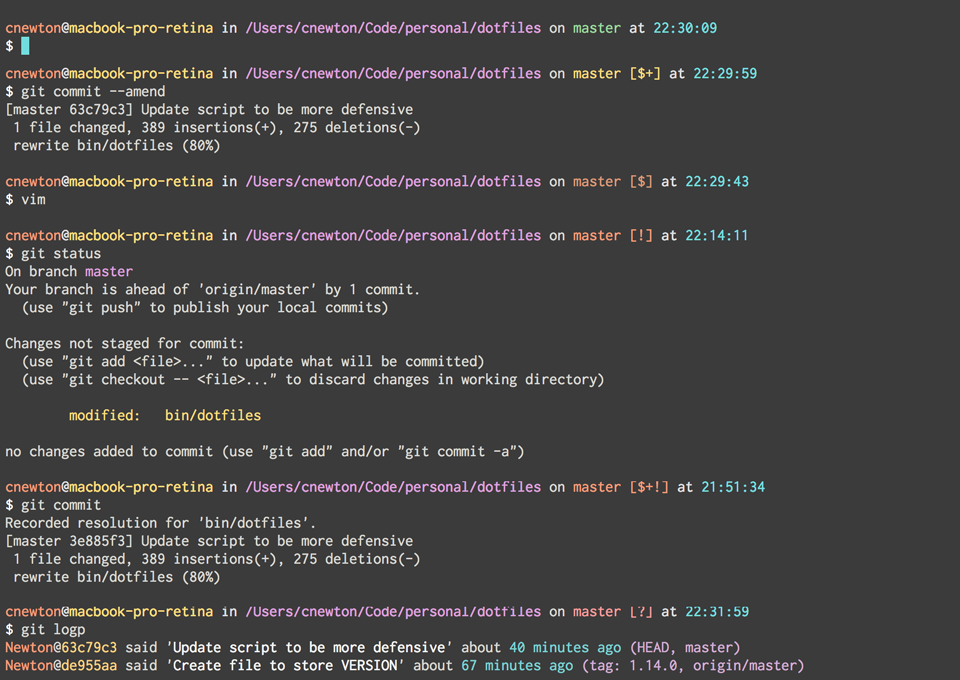
A custom bash prompt based on the Seti UI color palette and influenced by @necolas, @gf3 and @cowboy custom prompts. When your current working directory is a Git repository, the $PROMPT will display the checked-out branch's name (and failing that, the commit SHA that HEAD is pointing to). The state of the working tree is reflected in the following way:
| Symbol | Meaning |
|---|---|
| + | Uncommitted changes |
| ! | Unstaged changes |
| ? | Untracked files |
| $ | Stashed files |
For best results with iTerm, you should install the SETI color scheme for iTerm. Further details are in the ./conf/bash_prompt file.
Any private and custom Bash commands and configuration should be placed in a $HOME/.bash_profile.local file. This file will not be under version control or committed to a public repository. If $HOME/.bash_profile.local exists, it will be sourced for inclusion in bash_profile. The same goes for any local Git configuration but within the $HOME/.gitconfig.local
Here is an example ~/.bash_profile.local:
# Github Issues library token
export GITHUB_TOKEN="<insert github token>"

# Aliases
alias code="cd ~/Code"