Releases: goodrain/rainbond
v6.5.1-release

What's Changed
Bugs Fix
- Fix the issue where the application list cannot be fully displayed due to permission issues.
- Fixed the issue where the zip package could not be re-uploaded.
- Optimize the loading performance of front-end pages.
Full Changelog: v6.5.0-release...v6.5.1-release
v6.5.0-release
Rainbond v6.5.0 Released: UI Refresh and Precise Troubleshooting
In Rainbond v6.5.0, we paused the stacking of major features to focus on refining the product's User Experience and Operational Efficiency.
This update brings a comprehensive UI refactor, delivering a more modern visual experience. On the operational side, we have significantly optimized component status feedback and log collection mechanisms, eliminating the guesswork in troubleshooting. Furthermore, by introducing next-generation image acceleration technology, the installation time for the All-in-One version has been reduced to just 1.5 minutes.
Here is an overview of the core updates in v6.5.0:
UI Refresh: More Modern, More Focused
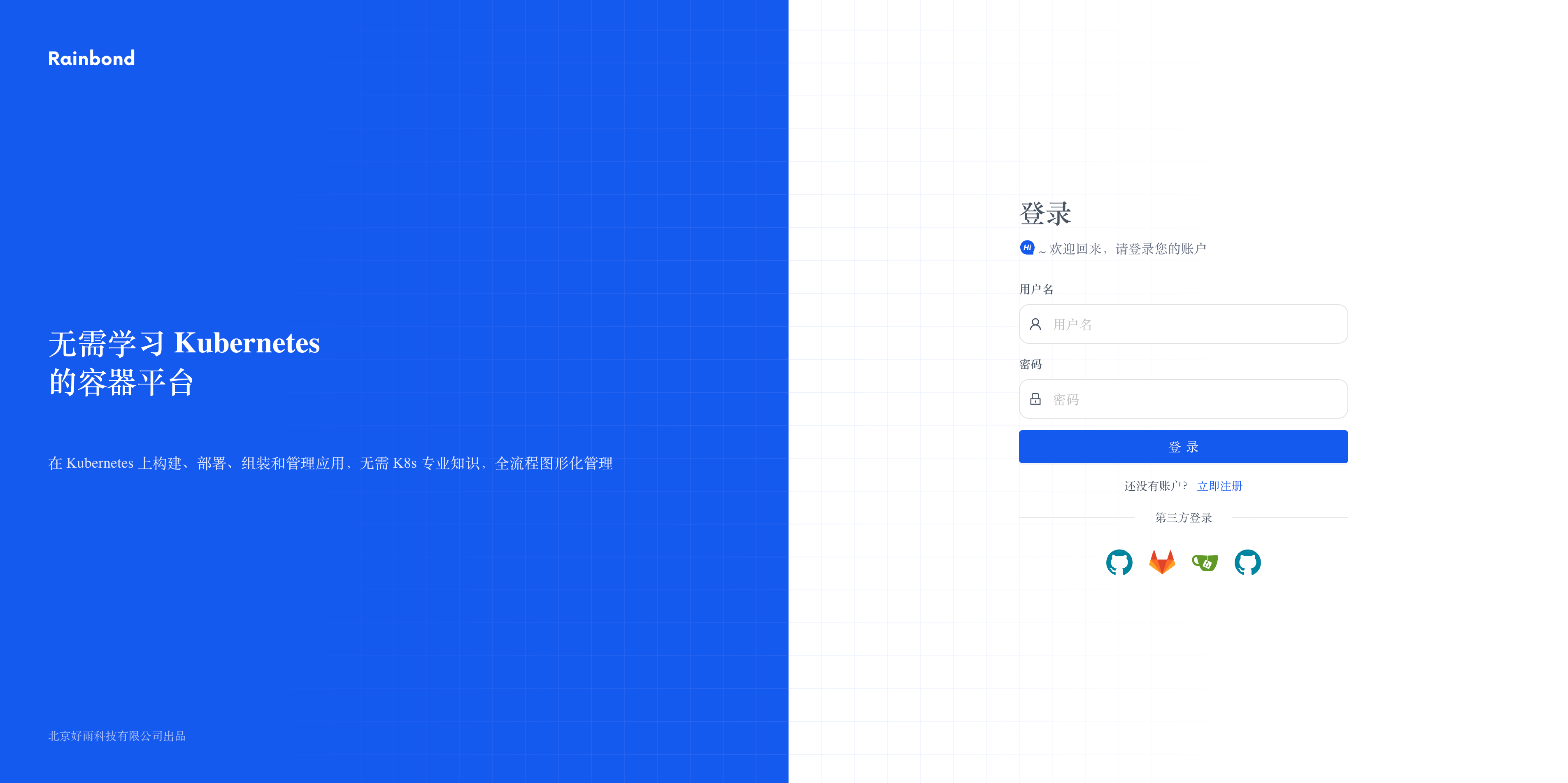
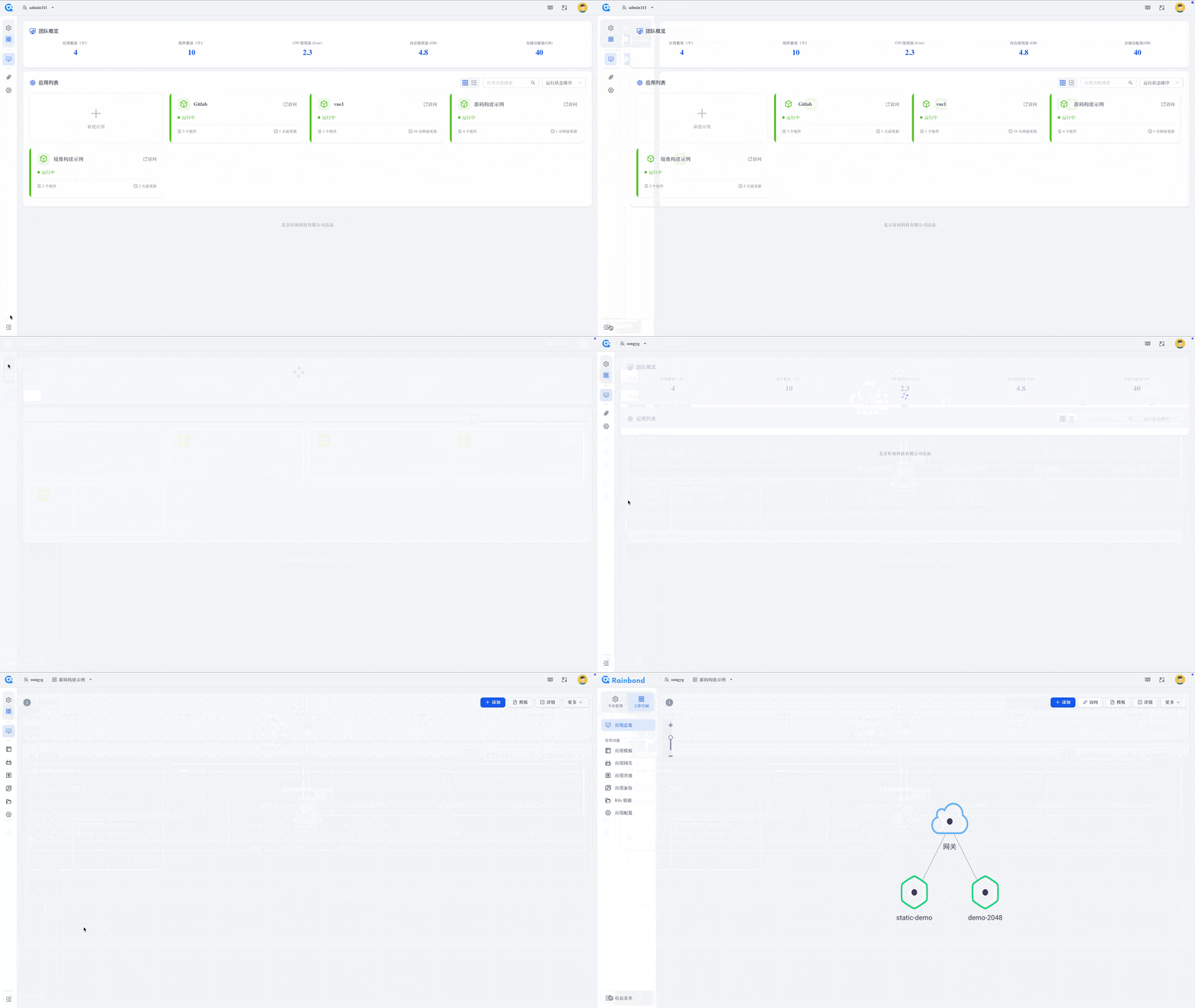
To provide a better user experience, we have completely upgraded Rainbond's overall UI style.
- Brand New Login Page: Features a cleaner, business-oriented blue tone design, offering a fresh and professional visual appeal.
- Sidebar Refactor: Reorganized the layout and icon design of the sidebar navigation. The collapsed menu is more compact with a clearer hierarchy, maximizing the workspace on the right to focus users' attention on business topology and resource management.
- Overall Style Optimization: From button corner radii to font spacing, we have polished numerous details to make the overall interface style more unified and refined.
Troubleshooting Upgrade: No More Guesswork, Auto-Capture Crash Scenes
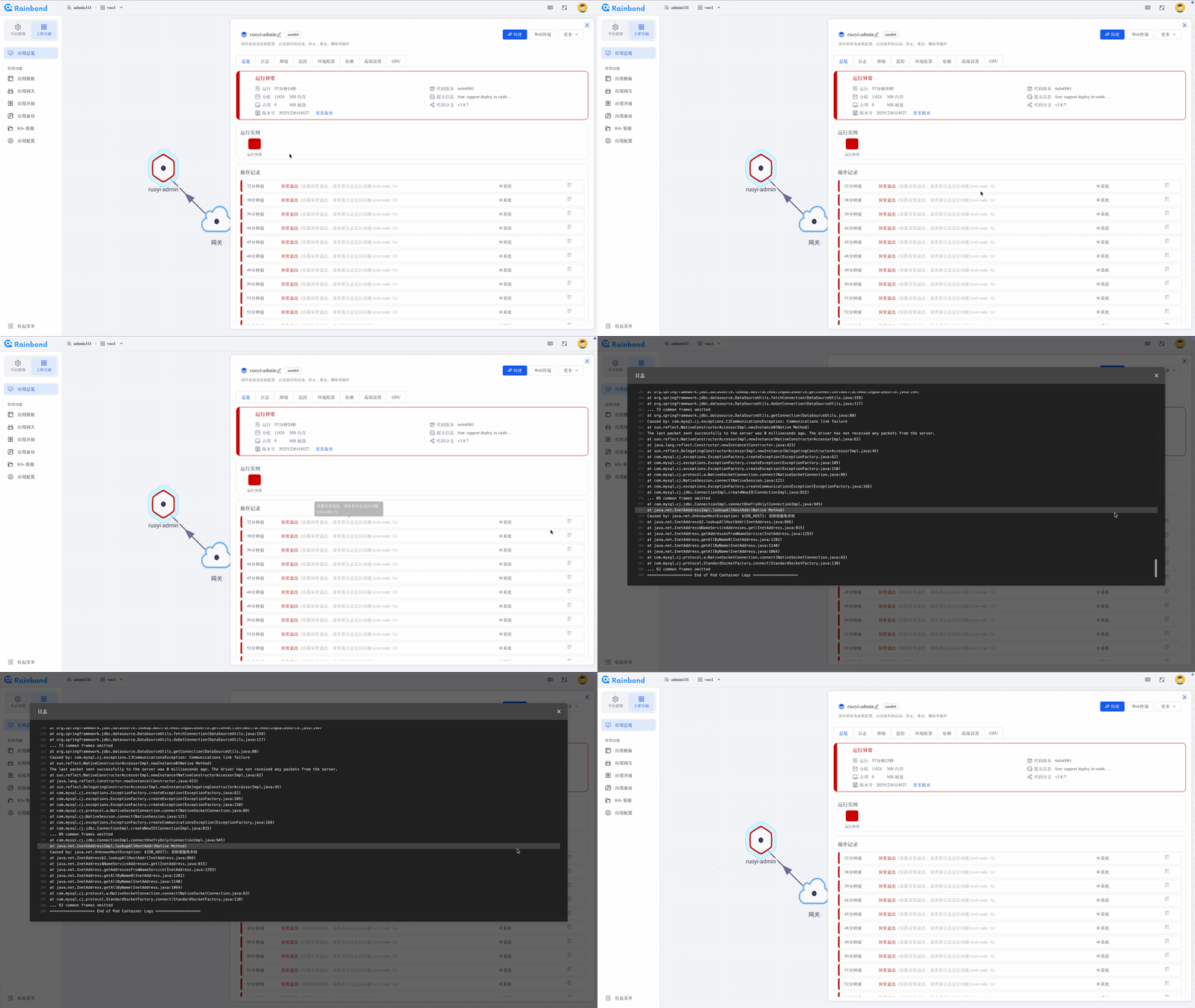
In the past, container abnormal exits (CrashLoopBackOff) or OOM (Out of Memory) errors were often the biggest headaches because critical error logs would disappear after the container restarted.
In v6.5.0, we have deeply optimized the Component Status and Log System:
- Auto-Collect Abnormal Logs: When an application behaves abnormally, experiences OOM, or exits unexpectedly, the system automatically collects and persists the log from the last container exit. You no longer need to stare at the screen waiting to reproduce the issue—simply view the logs to reconstruct the scene.
- Timely Status Feedback: Optimized the logic for monitoring component running status. Operation records now capture error information more keenly and expose it immediately through operation logs, helping developers quickly pinpoint configuration errors or resource bottlenecks.
Fast Installation Experience Optimization
For users wanting to try Rainbond quickly, download and installation speed is the first hurdle.
v6.5.0 introduces advanced stargz-snapshotter (lazy loading) technology, dramatically slimming down and accelerating the All-in-One installation package:
- Size Reduced: The entire installation image size has dropped from the original 2GB to approximately 300MB.
- Speed Boost: Thanks to the reduced image size and on-demand loading technology, in a standard network environment, the time from a single command to platform startup has been optimized from 5 minutes to 1 minute 30 seconds.
Detailed Changelog
New Features & Optimizations
- Comprehensive optimization of platform UI styling; refactored login page and sidebar navigation layout.
- Adopted Stargz technology to optimize the quick installation experience, reducing image size to 300MB and startup time to 1.5 minutes.
- Optimized component status monitoring mechanism; operation records now display more detailed error causes.
- Added automatic collection of container abnormal exit logs (Crash/OOM), supporting
Previous Logviewing. - Added Object Storage TTL to automatically clean up old uploaded build packages.
- Building from image now supports metadata parsing to automatically obtain
env,volume, and other parameters #2434. - Optimized host installation script with added port detection mechanism.
- Optimized startup time for all services in the region.
🐛 Bug Fixes
- Fixed an issue where environment variables could not be added to third-party components #2457.
- Fixed an issue where the Chaos component could not be built for the first time after a restart.
- Fixed a routing issue when pulling images after adding a new node.
Platform Upgrade
- Online Environment: Go to
Platform Management -> Enterprise Settings -> Upgradeand execute the one-click upgrade. - Offline Environment: Please read the Offline Upgrade Documentation.
Full Changelog: v6.4.1-release...v6.5.0-release
v6.4.1-release
What's Changed
🚀 New Feature
- Support for resumable transfers (checkpoint/breakpoint resume) for large image packages.
🛠️ Bugs Fix
- Fixed an issue where regular users failed to log in under SQLite mode (#2435).
- Fixed an issue where the
commond(command) added in Advanced Properties did not take effect. - Fixed an issue where there was no prompt/notification when downloading files from file storage.
- Fixed an issue where excessive gateway logs in Platform Management could cause the browser to crash.
- Fixed an issue where applications installed from the App Store could not modify the build source after network disconnection (#2437).
- Fixed an issue where the cluster node status was displayed incorrectly.
- Fixed an issue where automatic cleanup for the image registry did not take effect.
Full Changelog: v6.4.0-release...v6.4.1-release
Chinese
🚀 新功能
- 支持较大镜像包断点续传。
🛠️ 缺陷修复
v6.4.0-release
Rainbond v6.4.0 Released: Refactored Component Wizard, and New ROI Offline Installer
Following the integration of application and component views in Rainbond v6.3.0 to optimize user navigation, Rainbond v6.4.0 shifts the focus back to the core scenarios of "Deployment" and "Delivery".
This update brings a comprehensive visual and interactive refactoring to the Component Creation Wizard, making the deployment logic clearer. We have deeply integrated KubeBlocks to address the management needs of stateful services like databases. Additionally, for private delivery scenarios, we have launched the ROI (Rainbond Offline Installer) tool, solving the complexity of installing Kubernetes clusters and the Rainbond platform in offline environments.
Here is an overview of the core updates in v6.4.0:
1. Component Creation Wizard Refactor: Clear Classification & Better Guidance
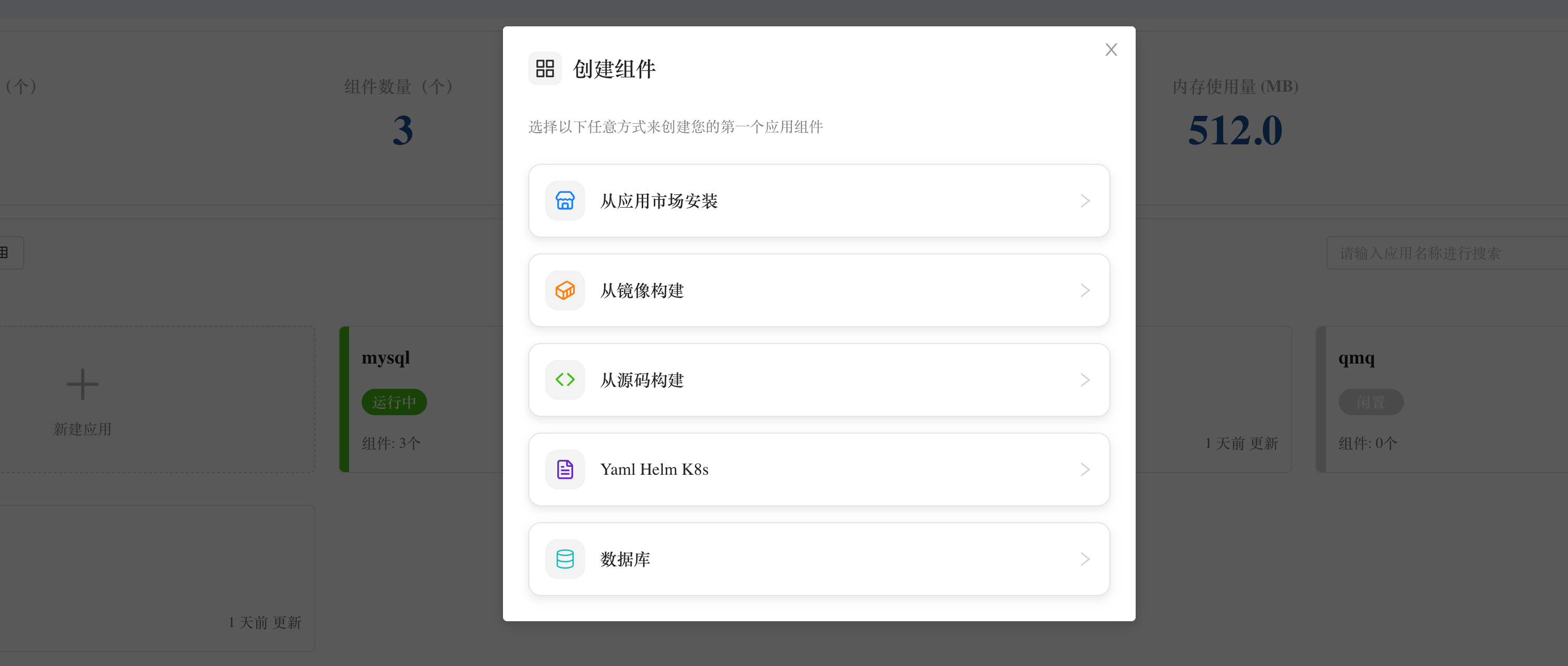
To address issues with deep hierarchy and unintuitive classification in previous versions, we performed a UI refactor of the Component Creation Wizard in v6.4.0.
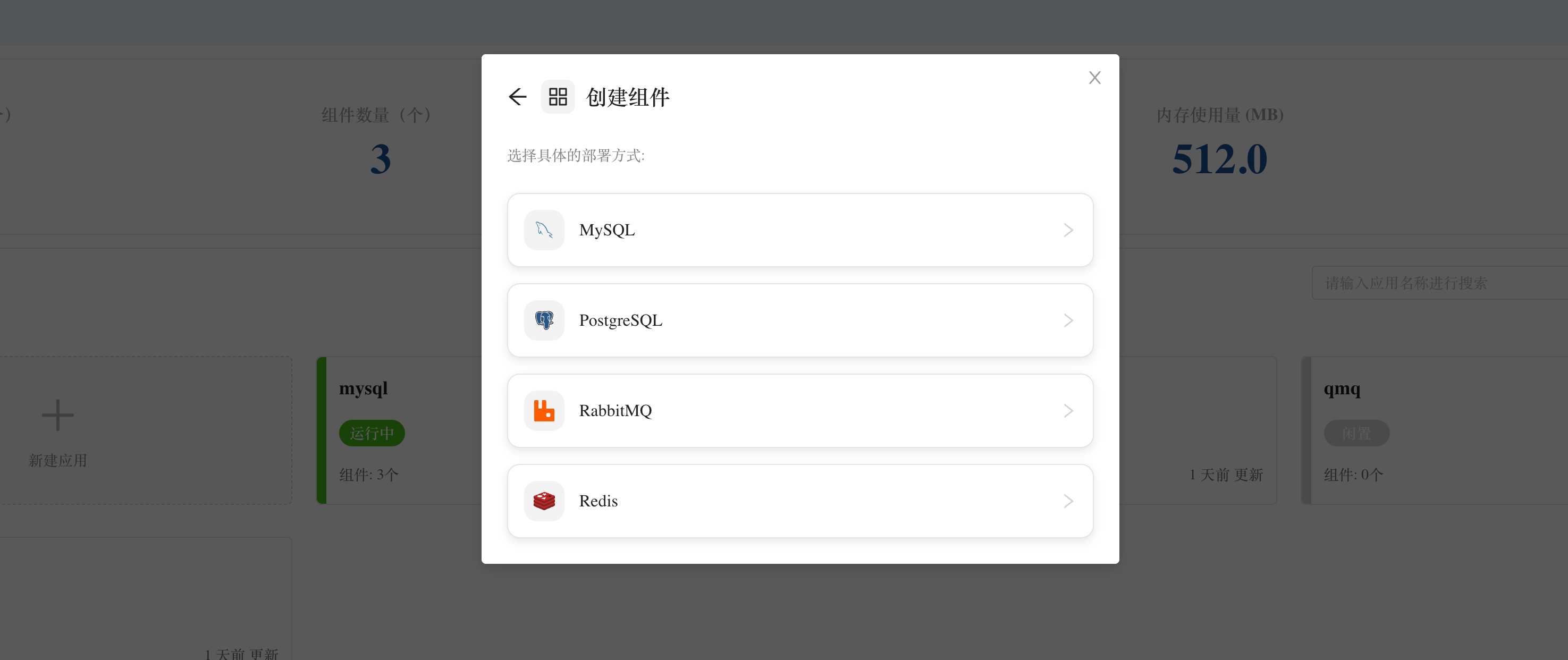
The new wizard adopts a card-based design, clearly dividing the user's deployment path into five categories:
- Install from App Store
- Build from Image
- Build from Source Code
- Import via YAML / Helm / K8s
- Database (New)
This flat classification design ensures that whether you are a Rainbond newcomer or an experienced developer accustomed to rapid deployment, you can quickly find the right entry point, significantly reducing cognitive load during operations.
2. KubeBlocks Integration: Enhanced Database Management
In the new creation wizard, the addition of the Database entry marks the official integration of KubeBlocks into Rainbond. Please note that this entry is not enabled by default; the "Database" option will only appear after the KubeBlocks plugin is deployed in the platform. For installation steps, please refer to the documentation: Database Integration Guide.
Running high-availability, production-grade databases on Kubernetes has long had a high barrier to entry. By integrating KubeBlocks capabilities, Rainbond now supports the one-click graphical deployment of mainstream databases and middleware such as MySQL, PostgreSQL, Redis, and RabbitMQ.
This goes beyond simple deployment; KubeBlocks empowers these components with robust lifecycle management capabilities (such as high-availability configuration, backup/restoration, and monitoring), ensuring that stateful services run more stably and reliably on Rainbond.
Acknowledgement:
The KubeBlocks integration module was contributed by student developer Deng Jingtong, who participated in the Open Source Promotion Plan (OSPP). We would like to extend our special thanks to Deng Jingtong for his hard work, and to the OSPP community for their support of the open-source ecosystem!
3. ROI Tool: One-Click Delivery of Production Clusters in Offline Environments
Previously, offline installation of Rainbond presented a high barrier. Older versions only provided Helm-based offline installation, requiring users to solve the complex problem of installing a high-availability Kubernetes cluster in an offline environment themselves. This was not only time-consuming but also prone to failure due to environmental differences.
To completely solve this pain point, v6.4.0 introduces the Rainbond Offline Installer (ROI) CLI tool.
Built-in K8s, One-Click Setup
The biggest breakthrough of the ROI tool is that it not only installs Rainbond but also includes the capability to install a production-grade Kubernetes cluster.
- Minimal Operations: No need for complex K8s deployment scripts.
- Full-Stack Delivery: On physical or virtual machines with absolutely no internet access, ROI can automatically complete the full installation from scratch, including NFS Server, MySQL Master-Slave cluster, Kubernetes cluster, and the Rainbond platform.
- Production Ready: The clusters delivered by ROI fully meet production environment standards, truly realizing an "out-of-the-box" experience in offline environments.
Now, even in strict intranet environments, you can easily obtain a complete Rainbond Cloud-Native Application Management Platform, just like an online installation.
4. Topology Graph Upgrade: Edit Mode & Drag-and-Drop Orchestration
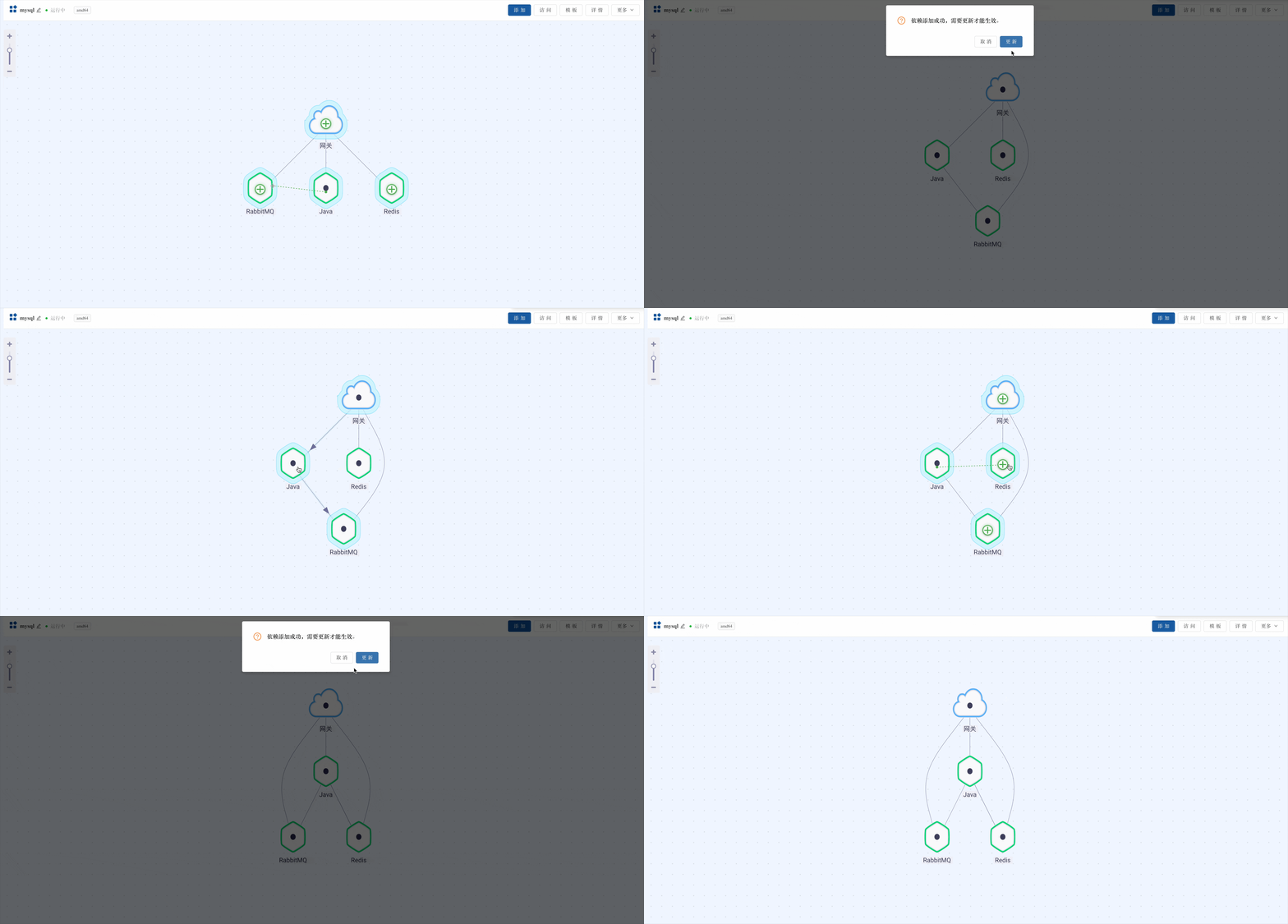
In addition to the features above, we have continued to optimize the interactive experience of the Application Topology Graph. The topology graph now supports Edit Mode:
- Right-Click Quick Management: Right-click directly on a component in the topology graph to perform operations such as update, restart, access console, or delete, without entering the details page.
- Drag-and-Drop Dependencies: Establish dependency relationships (Service Registration/Discovery) visually by dragging a line from one component to another.
Previously, establishing dependencies required entering a configuration page. Now, simply click and hold a component, drag the line to another component, and release to complete the dependency setup.
Changelog
New Features
- Component Deployment Wizard UI Refactor
- Topology Graph Edit Mode
- Integrated KubeBlocks for Database Management @furutachiKurea
- Integrated Gitea Code Repository #2215
- Component build source supports re-uploading local tar image packages #2282
- Source build supports selecting different Dockerfiles (e.g., Dockerfile.test, Dockerfile.prd) #2301
- Support modifying default ports such as 8443 #2376
Bug Fixes
- Fixed historical build logs missing after rbd-api restart #2240
- Fixed build failure after changing default ports like 80, 443 #2260
- Fixed console inaccessibility after changing port 7070 #2326
- Fixed TCP port numbers not syncing to components #2331
- Fixed local storage not displaying #2352
- Fixed certificate update failure #2353
- Fixed OpenAPI interface exceptions #2394 @massinger
- Fixed affinity content reset when changing build source #2395
- Fixed OAuth build architecture issues in ARM environments
- Fixed host installation passing wrong IP by default
- Fixed issue where Cluster ID was mandatory during host installation
- Fixed inability to delete Loadbalancer when creation fails
- Fixed issue where adding configuration file permissions during component creation did not take effect
Optimizations
- Optimized cluster command-line loading speed
- Optimized host installation usage
- Added YAML validation for component advanced properties
Platform Upgrade
- Online Environment: Go to Platform Management -> Enterprise Settings -> Upgrade and execute one-click upgrade.
- Offline Environment: Please read the Offline Upgrade Documentation.
Full Changelog: v6.3.4-release...v6.4.0-release
Chinese
Rainbond v6.4.0 发布:重构组件创建向导,推出 ROI 离线安装工具
在 Rainbond v6.3.0 中,我们通过打通应用与组件视图,优化了用户的操作路径。在最新的 v6.4.0 版本中,我们将关注点重新回到了“部署”与“交付”这两个核心场景。
本次更新重点对组件创建向导进行了视觉与交互的重构,使其逻辑更加清晰;深度集成 KubeBlocks,补齐了对数据库等有状态服务的管理短板;同时,针对私有化交付场景,推出了 ROI (Rainbond Offline Installer) 工具,解决了离线环境下 K8s 集群与平台安装复杂的难题。
以下是 v6.4.0 版本的核心更新解读:
一、组件创建向导重构:分类清晰,引导明确
为了解决原有创建入口层级较深、分类不直观的问题,我们在 v6.4.0 中对组件创建向导进行了 UI 重构。
新的向导页采用了卡片式设计,将用户的部署路径明确划分为五大类:
- 从应用市场安装
- 从镜像构建
- 从源码构建
- Yaml / Helm / K8s 导入
- 数据库(新增)
这种扁平化的分类设计,让无论是初次接触 Rainbond 的新手,还是习惯快速部署的开发者,都能在第一步迅速找到对应的入口,减少了操作过程中的认知干扰。
二、集成 KubeBlocks:增强数据库管理能力
在新的创建向导中,新增的数据库入口标志着 Rainbond 正式集成了 KubeBlocks。 该入口并非默认开启,需要在平台中部署 KubeBlocks 插件后,创建向导中才会展示数据库选项。具体安装步骤请参考文档:数据库集成使用文档。
长期以来,在 Kubernetes 上运行高可用的生产级数据库存在一定门槛。通过集成 KubeBlocks 的能力,Rainbond 现在支持通过图形化界面一键部署 MySQL、PostgreSQL、Redis、RabbitMQ 等主流数据库与中间件。
这不仅是简单的部署,更重要的是通过 KubeBlocks 赋予了这些组件更完善的生命周期管理能力(如高可用配置、备份恢复、监控等),让有状态服务在 Rainbond 上的运行更加稳定可靠。
KubeBlocks 集成模块是由参与 开源之夏 (OSPP) 活动的学生开发者邓靖桐贡献完成的。在此,我们特别感谢邓靖桐同学的辛勤付出,同时也感谢开源之夏社区对开源生态的支持!
三、推出 ROI 工具:离线环境一键交付生产集群
在过去,Rainbond 的离线安装一直是一个较高的门槛。旧版本仅提供基于 Helm 的离线安装方式,这意味着用户必须先自行解决在离线环境中安装高可用 Kubernetes 集群这一复杂难题,不仅耗时耗力,还容易因环境差异导致安装失败。
为了彻底解决这一痛点,v6.4.0 正式推出了 Rainbond Offline Installer (ROI)命令行工具 。
自带 K8s,一键成型
ROI 工具最大的突破在于,它不仅负责安装 Rainbond,更内置了生产级 Kubernetes 集群的安装能力。
- 极简操作:不再需要繁琐的 K8s 部署脚本。
- 全栈交付:在完全无网的物理机或虚拟机上,ROI 可以从零开始,自动完成 NFS Server、MySQL主从集群、Kubernetes 集群以及 Rainbond 平台的全套安装。
- 生产就绪:通过 ROI 交付的集群完全符合生产环境标准,真正实现了离线环境下的开箱即用。
现在,即使在严苛的内网环境,您也能像在线安装一样轻松获得一套完整的 Rainbond 云原生应用管理平台。
四、拓扑图体验升级:支持编辑态与拖拽编排
除了上述功能,我们继续优化了应用拓扑图的交互体验。现在的拓扑图支持编辑态操作:
- 右键快捷管理:直接在拓扑图组件上点击右键,即可进行更新、重启、进入控制台或删除等操作,无需进入详情页。
- 拖拽生成依赖:通过鼠标拖拽连线,即可直观地在组件间建立依赖关系(服务注册与发现),让架构编排更加直观。
以往建立组件间的依赖关系(服务注册/发现)需要进入配置页面。现在,您只需按住一个组件,将其连线拖拽至另一个组件,即可松手完成依赖关系的建立。
详细变更
新功能
- 组件部署向导 UI 重构
- 拓扑图支持编辑态
- 集成 Kubeblock 数据库管理
- 集成 Gitea 代码仓库 #2215
- 组件构建源支持重新上传本地 tar 镜像包 #2282
- 源码构建支持选择不同的 Dockerfile,如 Dockerfile.test、Dockerfile.prd #2301
- 支持修改 8443 等默认端口 #2376
Bug 修复
- rbd-api 重启后历史构建日志丢失 #2240
- 修复更改 ...
Contributors


Assets 2
v6.3.4-release
What's Changed
New Features
- Support for Load Balancer #2298
- Support for viewing installation component running logs when creating a cluster based on a host #2283
- Added Java 21 and 25 LTS versions for source code builds #2329
- Added NodeJS 21, 22, 23, and 24 versions for source code builds #2333
- Added Go 1.21, 1.22, 1.23, 1.24, and 1.25 versions for source code builds #2332
- Component scaling resources now support custom input
Feature Improvements
- Simplified the image creation and detection process #2287
- Optimized topology map loading performance
Bug Fixes
- Gateway management client-control plugin save not taking effect
- Architecture mismatch when creating components/quickly copying from OAuth under ARM architecture
- Unable to save when adding multiple component backends in gateway management
Upgrade
Note: The gateway service will be upgraded, which may cause short-term service unavailability.
- For online environments, perform the upgrade in
Platform Management > Enterprise Settings > Upgrade. - For offline environments, refer to the upgrade documentation.
To use the latest JDK version, you need to upgrade the builder image as follows:
Qucik install:
docker exec -it rainbond bash
k3s ctr i pull registry.cn-hangzhou.aliyuncs.com/goodrain/builder:stable-amd64
k3s ctr i rm goodrain.me/builder:latest-amd64
k3s ctr i tag registry.cn-hangzhou.aliyuncs.com/goodrain/builder:stable-amd64 goodrain.me/builder:latest-amd64
k3s ctr i push --platform=amd64 -k -u admin goodrain.me/builder:latest-amd64
# passwrod: admin1234
Via host install:
export CONTAINERD_ADDRESS=/run/k3s/containerd/containerd.sock
/var/lib/rancher/rke2/bin/ctr i pull registry.cn-hangzhou.aliyuncs.com/goodrain/builder:stable-amd64
/var/lib/rancher/rke2/bin/ctr i rm goodrain.me/builder:latest-amd64
/var/lib/rancher/rke2/bin/ctr i tag registry.cn-hangzhou.aliyuncs.com/goodrain/builder:stable-amd64 goodrain.me/builder:latest-amd64
/var/lib/rancher/rke2/bin/ctr i push --platform=amd64 -k -u admin goodrain.me/builder:latest-amd64
# passwrod: admin1234
Full Changelog: v6.3.3-release...v6.3.4-release
Chinese
新功能
- 支持 Load Balancer #2298
- 基于主机创建集群支持查看安装组件运行日志 #2283
- Java 源码构建新增 21、25 LTS 版本#2329
- NodeJS 源码构建新增 21、22、23、24 版本 #2333
- Go 源码构建新增 1.21、1.22、1.23、1.24、1.25 版本 #2332
- 组件伸缩资源支持自定义输入
功能改进
- 简化镜像创建检测流程 #2287
- 优化拓扑图加载性能
Bug 修复
- 网关管理 client-control 插件保存不生效
- 在 ARM 架构下从 OAuth 创建组件/快速复制架构不匹配
- 网关管理添加多个组件后端无法保存
升级
- 在线环境:平台管理 -> 企业设置 -> 升级。
- 离线环境:https://www.rainbond.io/docs/upgrade/latest-version
使用最新 JDK 版本需升级 builder 镜像,如下:
快速安装:
docker exec -it rainbond bash
k3s ctr i pull registry.cn-hangzhou.aliyuncs.com/goodrain/builder:stable-amd64
k3s ctr i rm goodrain.me/builder:latest-amd64
k3s ctr i tag registry.cn-hangzhou.aliyuncs.com/goodrain/builder:stable-amd64 goodrain.me/builder:latest-amd64
k3s ctr i push --platform=amd64 -k -u admin goodrain.me/builder:latest-amd64
# passwrod: admin1234
基于主机安装:
export CONTAINERD_ADDRESS=/run/k3s/containerd/containerd.sock
/var/lib/rancher/rke2/bin/ctr i pull registry.cn-hangzhou.aliyuncs.com/goodrain/builder:stable-amd64
/var/lib/rancher/rke2/bin/ctr i rm goodrain.me/builder:latest-amd64
/var/lib/rancher/rke2/bin/ctr i tag registry.cn-hangzhou.aliyuncs.com/goodrain/builder:stable-amd64 goodrain.me/builder:latest-amd64
/var/lib/rancher/rke2/bin/ctr i push --platform=amd64 -k -u admin goodrain.me/builder:latest-amd64
# passwrod: admin1234v6.3.3-release
What's Changed
Feature Enhancements
- Optimize source code build language package to support local caching #2291
- Improve the open-source app store experience, allowing app installation without a phone number login #2297
- Optimize frontend source code build speed, skipping the install step if a cache exists #2245
- Optimize team view page loading speed
- Optimize component log push causing browser crashes due to excessive data #2309
Bug Fixes
- Fix Helm installation warning about low K8s version #2299
- Fix Gradle source code build timeout when fetching installation packages #2300
- Fix Tencent Cloud MySQL 8.0 SQL statement compatibility #2304
- Fix inability to install Bitnami Charts #2292
- Fix offline source code build configuration being reset by the operator #2289
- Fix logs not being pushed after component update or restart unless the page is refreshed #2241
Upgrade
Note: The gateway service will be upgraded, which may cause short-term service unavailability.
- For online environments, perform the upgrade in
Platform Management > Enterprise Settings > Upgrade. - For offline environments, refer to the upgrade documentation.
Full Changelog: v6.3.2-release...v6.3.3-release
Chinese
功能改进
- 优化源码构建语言包支持缓存到本地 #2291
- 改进开源应用商店体验,不需要手机号登录即可安装应用 #2297
- 优化前端源码构建速度,有缓存则跳过 install 步骤 #2245
- 优化团队视图页面加载速度
- 优化组件日志推送过多导致浏览器崩溃 #2309
Bug 修复
- 修复 Helm 安装提示 K8s 版本较低问题 #2299
- 修复 Gradle 源码构建获取安装包超时 #2300
- 修复腾讯云 MySQL 8.0 SQL语句兼容性 #2304
- 修复 Bitnami Chart 无法安装 #2292
- 修复离线源码构建配置被 operator 重置 #2289
- 修复组件更新或重启后如不刷新页面则日志无法推送 #2241
升级
- 在线环境:平台管理 -> 企业设置 -> 升级。
- 离线环境:https://www.rainbond.io/docs/upgrade/latest-version
v6.3.2-release
New Feature
- Component environment variables support batch import and modification. #2242 Thanks @yunkst
- Add support for Emoji in component configuration files. #2250 @ZhangSetSail
Feature improvement
- Optimize the batch operation list of component inventory (Application Topology More - Batch Operations) #2248 @xuzhonglin12138
Bug Fixes
- Fix the issue where the application is mistakenly deleted when canceling the build while creating a dockercompose service under the application. #2261 @ZhangSetSail
- Fix the problem that TCP policies are not deleted when deleting the entire application. #2262 @ZhangSetSail
- Fix the issue where modified default access policies are not synchronized to the access button. #2255 @ZhangSetSail
- Optimize the prompt for source code build failure logs. #2256 @ZhangSetSail
- Fix the failure to switch OAuth source code build sources. #2246 @ZhangSetSail
- Fix the repeated initialization of source code build language versions. #2249 @zzzhangqi
- Fix the database initialization failure caused by the too short timeout of the console probe. @zzzhangqi
- Fix the repeated decompression of uploaded zip packages. #2264 @ZhangSetSail
- Fix the gateway 404 issue. @ZhangSetSail
- Fix the issue where the builder image cannot be obtained.
- Fix the EOF problem with the runner image.
Upgrade
Note: The gateway service will be upgraded, which may cause short-term service unavailability.
- For online environments, perform the upgrade in
Platform Management > Enterprise Settings > Upgrade. - For offline environments, refer to the upgrade documentation.
Full Changelog: v6.3.1-release...v6.3.2-release
Contributors


Assets 2
v6.3.1-release
Feature Improvements
- Support for Harbor Webhook #2196
- Helm installation supports modifying default ports 80 and 443 #2220
- Certificate management supports search functionality
- CRD supports the affinity field #2212
- Gateway supports adding wildcard domains #2230
- Optimized the display order of component dependency lists to prioritize components under the current application #2235
Bug Fixes
- Fixed an issue where container IP changes after restart in quick installation caused builds to fail to push images #2231
- Fixed the topology diagram not updating after editing component names #2232
- Fixed documentation description errors #2233 @furutachiKurea
- Fixed deleted components appearing in the dependency list #2236
- Fixed Gitlab OAuth login issues #2228
- Fixed route 404 errors after deleting components
- Fixed topology diagram card styling issues
Upgrade
- For online environments, perform the upgrade in
Platform Management > Enterprise Settings > Upgrade. - For offline environments, refer to the upgrade documentation.
Full Changelog: v6.3.0-release...v6.3.1-release
Contributors
Assets 2
v6.3.0-release
Rainbond v6.3.0 Released | Integration of Application and Component Views for a Smooth Experience
For a long time, many users have feedback on the issue of multiple view hierarchies when using Rainbond. The multi-level hierarchy of team views, application views, component views, etc., brings certain complexity in actual operations. As a platform focused on being application-centric, this operation path has a certain gap with the positioning of "application-centric". Users need to switch between different views to complete operations from the overall application architecture to component detail configuration, which to a certain extent affects the use efficiency and the coherence of the experience.
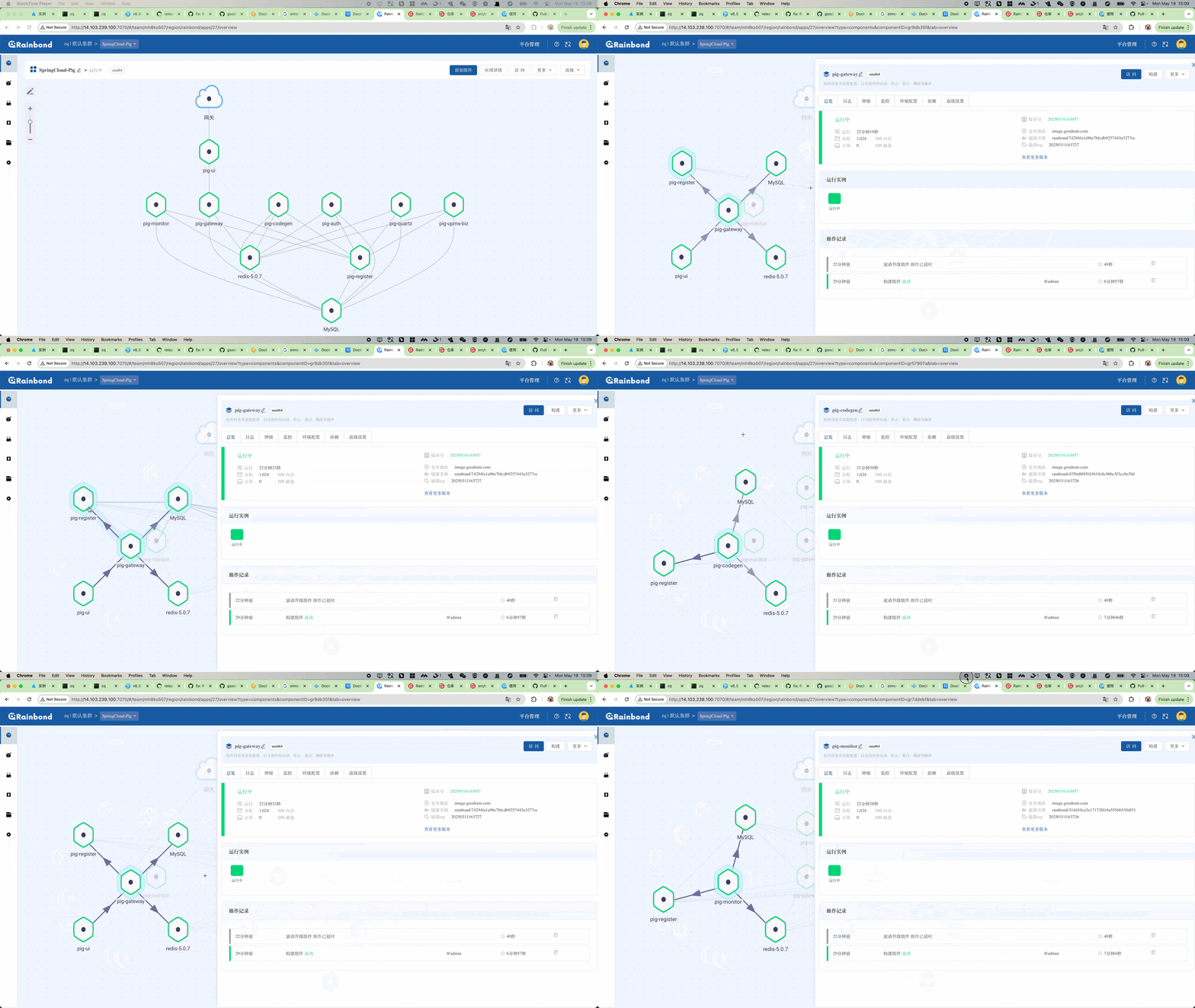
This time, we have connected applications and components
In Rainbond v6.3.0, the application management experience has ushered in a breakthrough innovation. When you click on any component in the topology diagram in the application view, the detailed information and operation panel of that component will pop up on the right side without page jumping. All the original separate component view pages are centralized in this interface, completely saying goodbye to the tediousness of switching back and forth between application and component views. It truly achieves a smooth experience of "click where you get what you need", making application management simple and direct, greatly improving operation efficiency, and bringing you unprecedented convenience and efficiency.
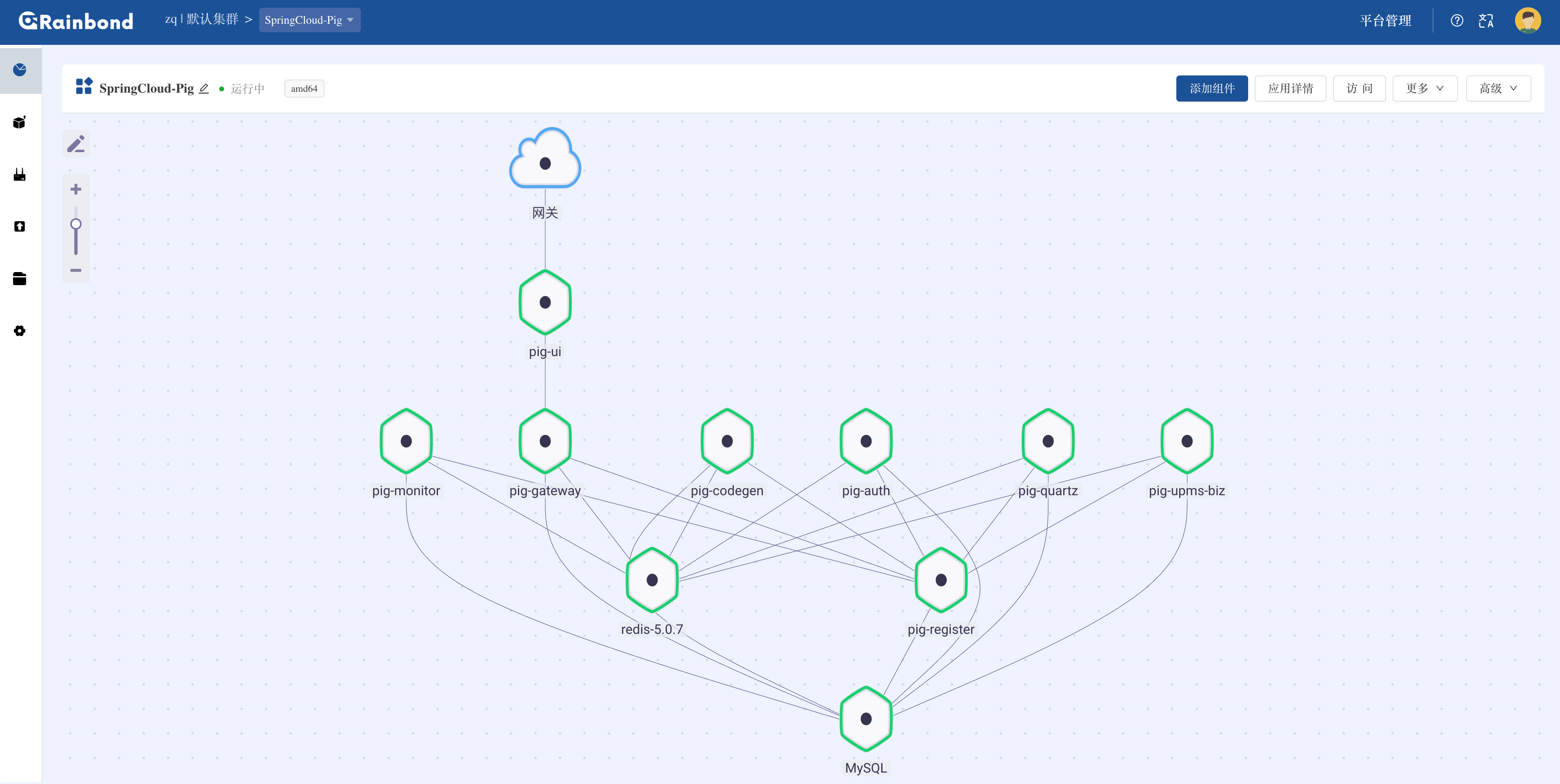
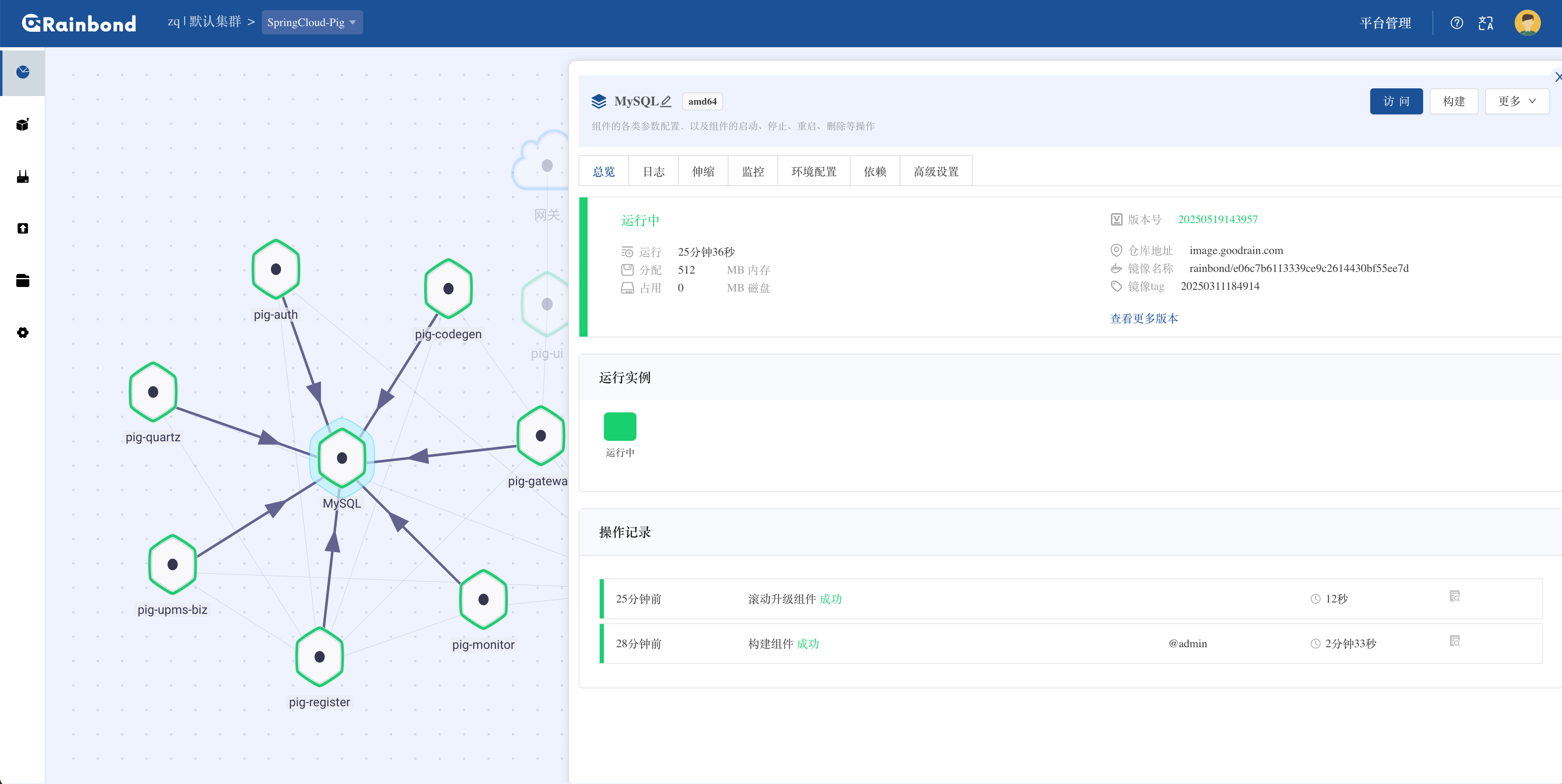
See the interaction effect through the Gif diagram.
Other Changes
- Integration of application and component views
- Fixed the issue of multiple metrics appearing in component resource monitoring
- Changed the user creation logic, no longer automatically creating the affiliated team
- Fixed the failure of Gitee code pulling
- Changed the gateway to not listen on ipv6 by default #2218
- Fixed some bugs after the integration of component views
- Fixed some bugs after the integration of application views
Upgrade
- For online environments, perform the upgrade in
Platform Management > Enterprise Settings > Upgrade. - For offline environments, refer to the upgrade documentation.
Full Changelog: v6.2.1-release...v6.3.0-release
v6.2.1-release
What's Changed
Bug Fixes
- Fix incomplete export of application templates
- Fix gateway inaccessibility after restarting components post-shutdown
- Fix rbd-worker service restarts caused by probe failures #2205
- Fix inability to start components when K8S resource CPU/memory parameters are unspecified
- Fix page loading failure when team has no associated cluster after cluster deletion
- Change component CPU resource monitoring to track actual usage
Upgrade
- For online environments, perform the upgrade in
Platform Management > Enterprise Settings > Upgrade. - For offline environments, refer to the upgrade documentation.
Full Changelog: v6.2.0-release...v6.2.1-release