


- 🧾 Project Overview
- 🚀 Features
⚠️ Disclaimer- 📦 Installation
- 🧪 Usage
- 💡 Examples
- 🕵️♂️ Cover your tracks
- 🤝 Contributing
- 🙏 Credits
Retrieves and aggregates public OSINT data about a GitHub user using Go and the GitHub API. Finds hidden emails in commit history, previous usernames, friends, other GitHub accounts, and more.
Screenshot
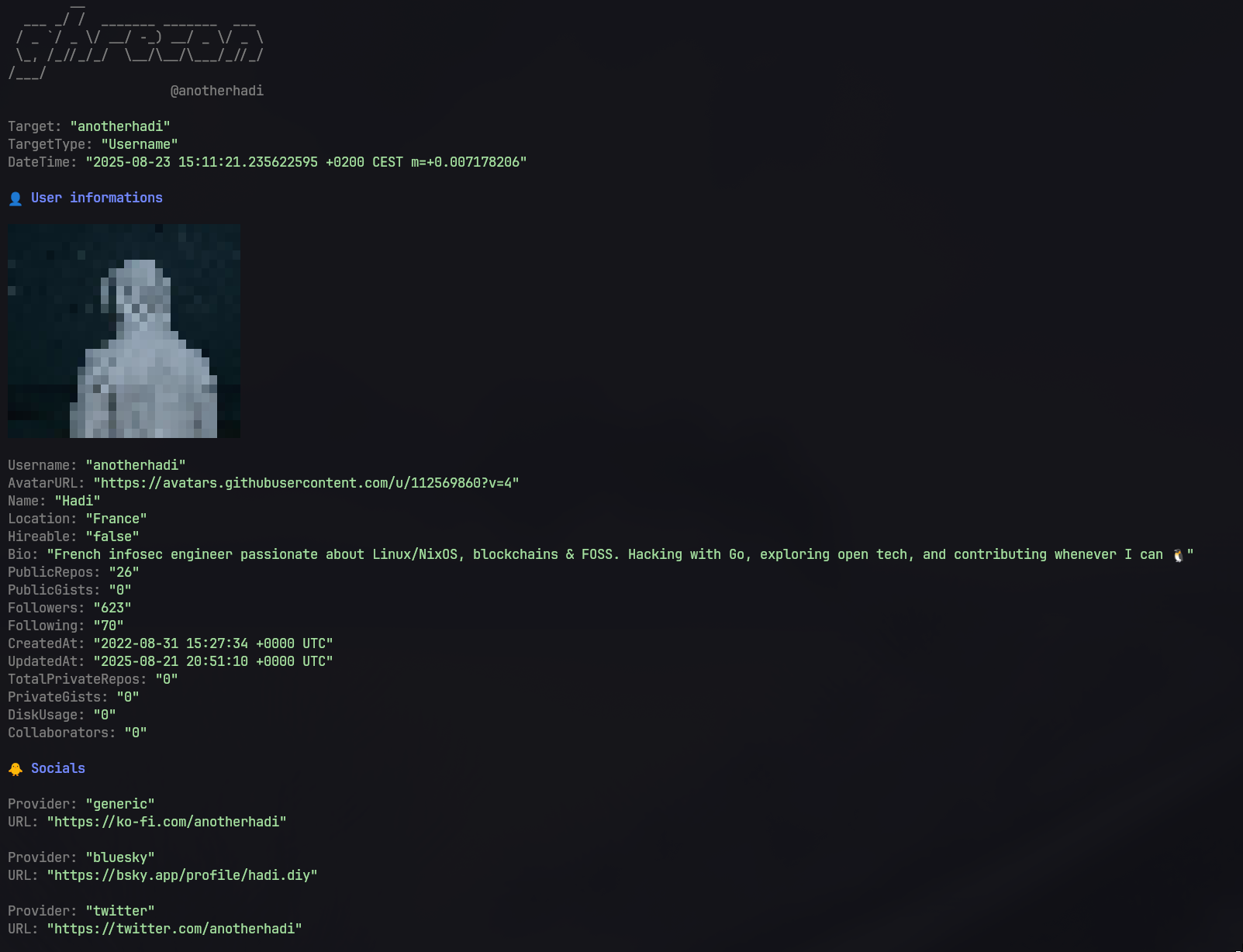
- Export results to JSON
From usernames:
- Retrieve basic user profile information (username, ID, avatar, bio, creation date)
- Display avatars directly in the terminal
- List organizations and roles
- Fetch SSH and GPG keys
- Enumerate social accounts
- Extract unique commit authors (name + email)
- Find close friends
- Deep scan option (clone repositories, run regex searches, analyze licenses, etc.)
- Use Levenshtein distance for matching usernames and emails
- TruffleHog integration to find secrets
From emails:
- Search for a specific email across all GitHub commits
- Spoof an email to discover the associated user account
This tool is intended for educational purposes only. Use responsibly and ensure you have permission to access the data you are querying.
go install github.com/anotherhadi/github-recon@latestClick to expand
From anywhere (using the repo URL):
nix run github:anotherhadi/github-recon -- [--flags value] target_username_or_emailPermanent Installation:
# add the flake to your flake.nix
{
  inputs = {
    github-recon.url = "github:anotherhadi/github-recon";
  };
}

# then add it to your packages
environment.systemPackages = with pkgs; [ # or home.packages
  inputs.github-recon.defaultPackage.${pkgs.system}
];github-recon [--flags value] target_username_or_email-t, --token string Github personal access token (e.g. ghp_aaa...). Can also be set via GITHUB_RECON_TOKEN environment variable. You also need to set the token in $HOME/.config/github-recon/env file if you want to use this tool without passing the token every time. (default "null")
-d, --deepscan Enable deep scan (clone repos, regex search, analyse licenses, etc.)
--max-size int Limit the size of repositories to scan (in MB) (only for deep scan) (default 150)
-e, --exclude-repo strings Exclude repos from deep scan (comma-separated list, only for deep scan)
-r, --refresh Refresh the cache (only for deep scan)
-s, --show-source Show where the information (authors, emails, etc) were found (only for deep scan)
-m, --max-distance int Maximum Levenshtein distance for matching usernames & emails (only for deep scan) (default 20)
--trufflehog Run trufflehog on cloned repositories (only for deep scan) (default true)
-S, --silent Suppress all non-essential output
--spoof-email Spoof email (only for email mode) (default true)
-a, --print-avatar Show the avatar in the output
-j, --json string Write results to specified JSON fileFor the best experience, provide a GitHub Personal Access Token. Without a token, you will quickly hit the rate limit and have to wait.
- For basic usage, you can create a token without any permissions.
- For the email spoofing feature, you need to add the
repoanddelete_repopermissions.
You can set the token in multiple ways:
-
Command-line flag:
github-recon -t "ghp_xxx..." -
Environment variable:
export GITHUB_RECON_TOKEN=ghp_xxx... -
Config file: Create the file
~/.config/github-recon/envand add:GITHUB_RECON_TOKEN=ghp_xxx...
Warning
For safety, it is recommended to create the Personal Access Token on a separate GitHub account rather than your main account. This way, if anything goes wrong, your primary account remains safe.
Here’s the process:
- Create a new repository.
- Make a commit using the target's email as the author.
- Push the commit to GitHub.
- Observe which GitHub account the commit is linked to. This method always works, but it only reveals the account if the email is set as the user’s primary email.
All of these steps are handled automatically by the tool, so you just need to provide the target email.
github-recon anotherhadi --token ghp_ABC123...
github-recon myemail@gmail.com # Find github accounts by email
github-recon anotherhadi --json output.json --deepscan # Clone the repo and search for leaked emailUnderstanding what information about you is publicly visible is the first step to managing your online presence. github-recon can help you identify your own publicly available data on GitHub. Here’s how you can take steps to protect your privacy and security:
- Review your public profile: Regularly check your GitHub profile and repositories to ensure that you are not unintentionally exposing sensitive information.
- Manage email exposure: Use GitHub's settings to control which email addresses are visible on your profile and in commit history. You can also use a no-reply email address for commits, and an alias email for your account. Delete/modify any sensitive information in your commit history.
- Be Mindful of Repository Content: Avoid including sensitive information in
your repositories, such as API keys, passwords, emails or personal data. Use
.gitignoreto exclude files that contain sensitive information.
You can also use a tool like TruffleHog to scan your repositories specifically for exposed secrets and tokens.
Useful links:
Feel free to contribute! See CONTRIBUTING.md for details.
Some features and ideas in this project were inspired by the following tools:
Big thanks to their authors for sharing their work with the community.