






Kick-start building top-tier B2B & B2C cloud SaaS products with sleek design, fully localized and accessible, vertical slice architecture, automated and fast DevOps, and top-notch security.
Built to demonstrate seamless flow: backend contracts feed a fully-typed React UI, pipelines make fully automated deployments to Azure, and a multi-agent AI workflow where PlatformPlatform-expert agents collaborate to deliver complete features following the opinionated architecture. Think of it as a ready-made blueprint, not a pile of parts to assemble.
- Backend - .NET 10 and C# 14 adhering to the principles of vertical slice architecture, DDD, CQRS, and clean code
- Frontend - React 19, TypeScript, TanStack Router & Query, React Aria for accessible UI
- CI/CD - GitHub actions for fast passwordless deployments of docker containers and infrastructure (Bicep)
- Infrastructure - Cost efficient and scalable Azure PaaS services like Azure Container Apps, Azure SQL, etc.
- Developer CLI - Extendable .NET CLI for DevEx - set up CI/CD is one command and a couple of questions
- AI rules - 30+ rules & workflows that guide AI tools to generate consistent, production-ready code
- Multi-agent workflow (Experimental) - Specialized autonomous AI agents expert in PlatformPlatform's architecture
Follow our up-to-date roadmap with core SaaS features like SSO, monitoring, alerts, multi-region, feature flags, back office for support, etc.
Show your support for our project - give us a star on GitHub! It truly means a lot! ⭐
TL;DR: Open the PlatformPlatform solution in Rider or Visual Studio and run the Aspire AppHost project.
For development, you need .NET, Docker, and Node. And GitHub and Azure CLI for setting up CI/CD.
Install prerequisites for Windows
-
Open a PowerShell terminal as Administrator and run the following command to install Windows Subsystem for Linux (required for Docker). Restart your computer if prompted.
wsl --install -
From an Administrator PowerShell terminal, use winget (preinstalled on Windows 11) to install any missing packages:
winget install Microsoft.DotNet.SDK.10
winget install Git.Git
winget install Docker.DockerDesktop
winget install OpenJS.NodeJS
winget install Microsoft.AzureCLI
winget install GitHub.cli
Install prerequisites for Mac
Open a terminal and run the following commands (if not installed):
- Install Homebrew, a package manager for Mac
brew install --cask dotnet-sdkbrew install --cask dockerbrew install git node azure-cli gh
Install prerequisites for Linux/WSL2
Open a terminal and run the following commands (if not installed):
-
Install Wget
sudo apt update && sudo apt-get install wget -y -
Install Microsoft repository
source /etc/os-release
wget https://packages.microsoft.com/config/$ID/$VERSION_ID/packages-microsoft-prod.deb -O packages-microsoft-prod.deb
sudo dpkg -i packages-microsoft-prod.deb
rm packages-microsoft-prod.deb
-
Install Node repository
curl -fsSL https://deb.nodesource.com/setup_18.x | sudo -E bash - -
Install GitHub Package repository
(type -p wget >/dev/null || (sudo apt update && sudo apt-get install wget -y)) \
&& sudo mkdir -p -m 755 /etc/apt/keyrings \
&& wget -qO- https://cli.github.com/packages/githubcli-archive-keyring.gpg | sudo tee /etc/apt/keyrings/githubcli-archive-keyring.gpg > /dev/null \
&& sudo chmod go+r /etc/apt/keyrings/githubcli-archive-keyring.gpg \
&& echo "deb [arch=$(dpkg --print-architecture) signed-by=/etc/apt/keyrings/githubcli-archive-keyring.gpg] https://cli.github.com/packages stable main" | sudo tee /etc/apt/sources.list.d/github-cli.list > /dev/null
-
Update packages
sudo apt-get update
-
Install .NET SDK 10.0, Node, GitHub CLI
sudo apt-get install -y dotnet-sdk-10.0 nodejs gh
-
Install Azure CLI
curl -sL https://aka.ms/InstallAzureCLIDeb | sudo bash -
Install Certificate
dotnet tool update -g linux-dev-certs
dotnet linux-dev-certs install
-
Trust Certificates
cd /usr/local/share/ca-certificates/aspnet-dev-{Environment.UserName}.crt && explorer.exe .
# Install self signed root certificate

# Open the windows certificate manager and import root certificate
# "\\wsl.localhost\Ubuntu-20.04\home\maximus\.aspnet\dev-certs\https\platformplatform.pfx"
We recommend you keep the commit history, which serves as a great learning and troubleshooting resource. 😃
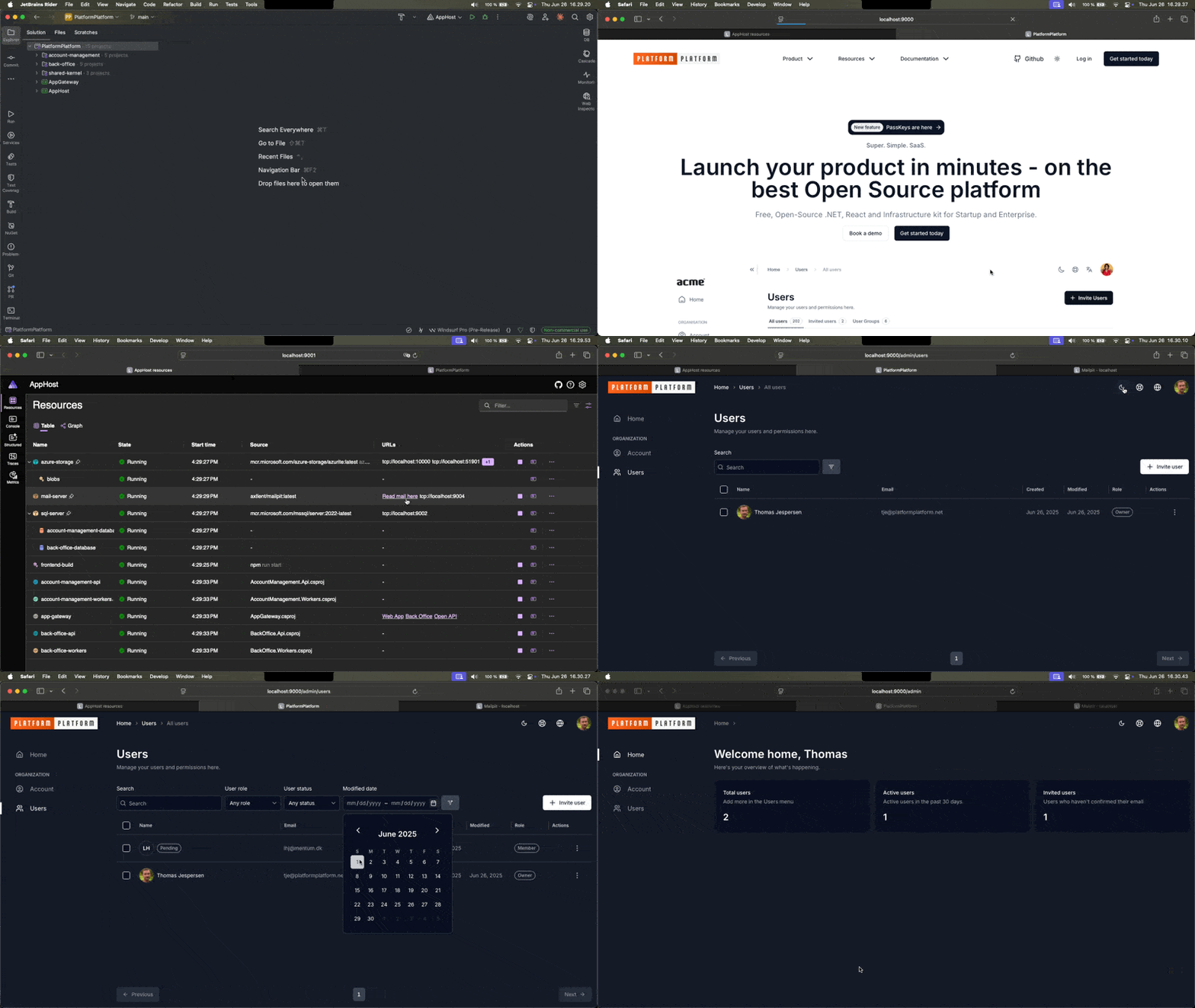
Using Aspire, docker images with SQL Server, Blob Storage emulator, and development mail server will be downloaded and started. No need install anything, or learn complicated commands. Simply run this command, and everything just works 🎉
cd application/AppHost
dotnet run # First time downloading Docker containers will take several minutes
Alternatively, open the PlatformPlatform solution in Rider or Visual Studio and run the Aspire AppHost project.
Once the Aspire dashboard fully loads, click to the WebApp and sign up for a new account (https://localhost:9000/signup). A one-time password (OTP) will be sent to the development mail server, but for local development, you can always use the code UNLOCK instead of checking the mail server. As shown here:
Run this command to automate Azure Subscription configuration and set up GitHub Workflows for deploying Azure Infrastructure (using Bicep) and compiling application code to Docker images deployed to Azure Container Apps:
cd developer-cli
dotnet run deploy # Tip: Add --verbose-logging to show the used CLI commands
You need to be the owner of the GitHub repository and the Azure Subscription, plus have permissions to create Service Principals and Active Directory Groups.
The command will first prompt you to login to Azure and GitHub, and collect information. You will be presented with a complete list of changes before they are applied. It will look something like this:
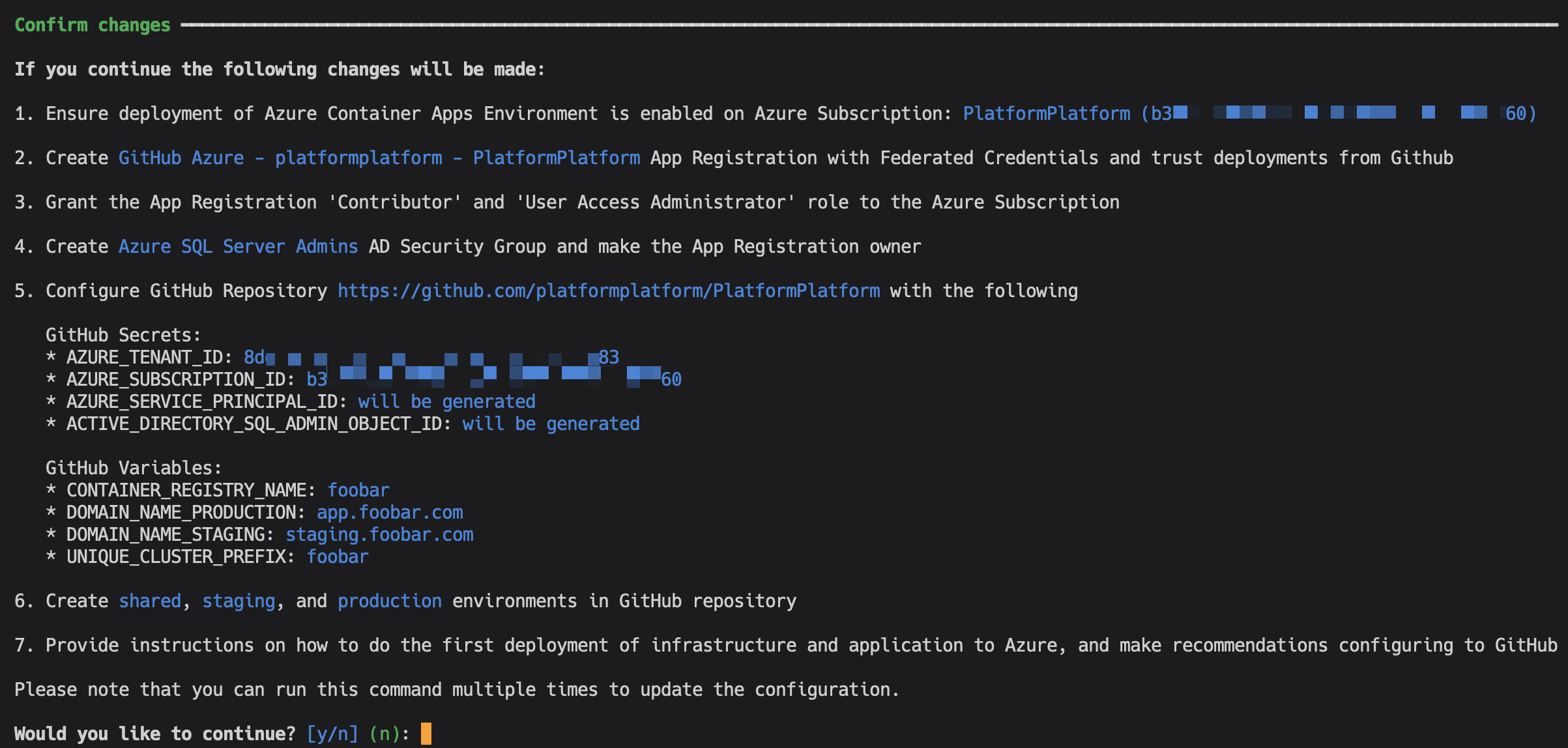
Except for adding a DNS record, everything is fully automated. After successful setup, the command will provide simple instructions on how to configure branch policies, Sonar Cloud static code analysis, and more.
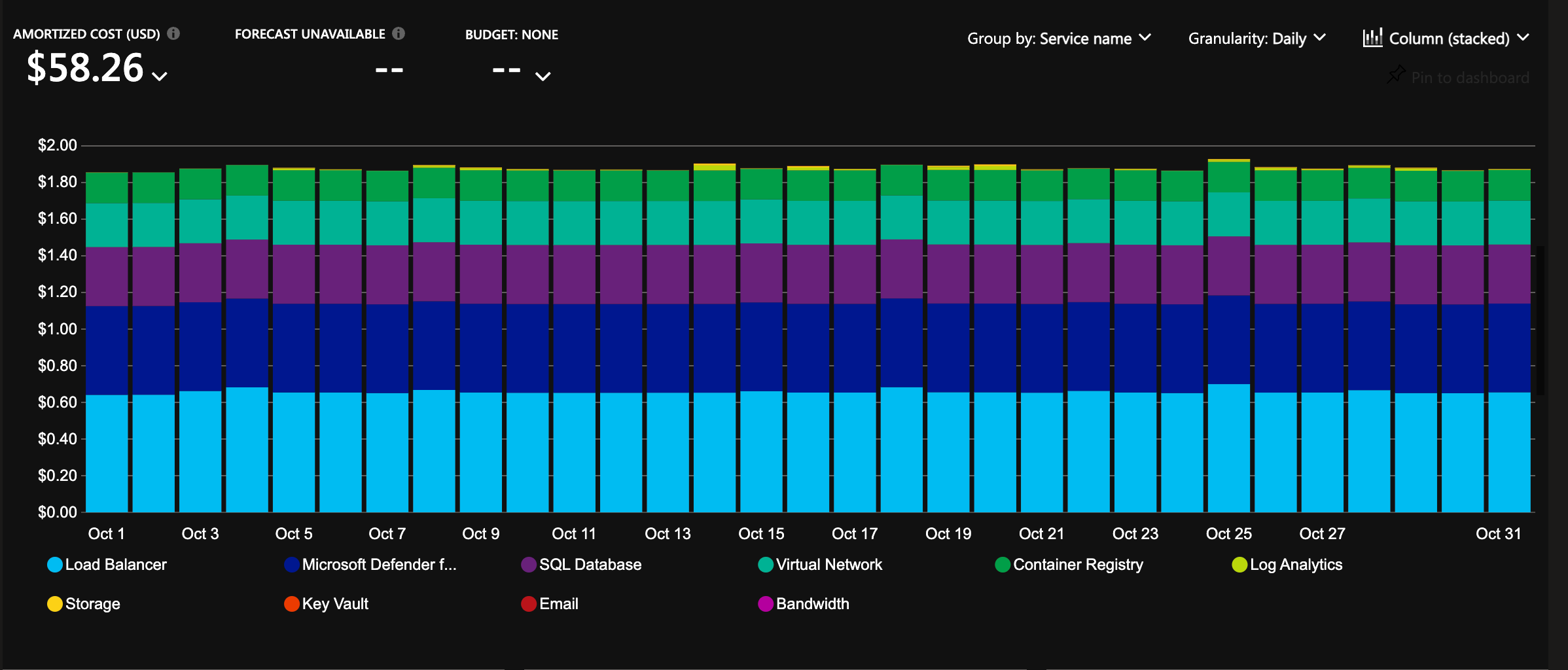
The infrastructure is configured with auto-scaling and hosting costs in focus. It will cost less than 2 USD per day for a cluster, and it will allow scaling to millions of users 🎉
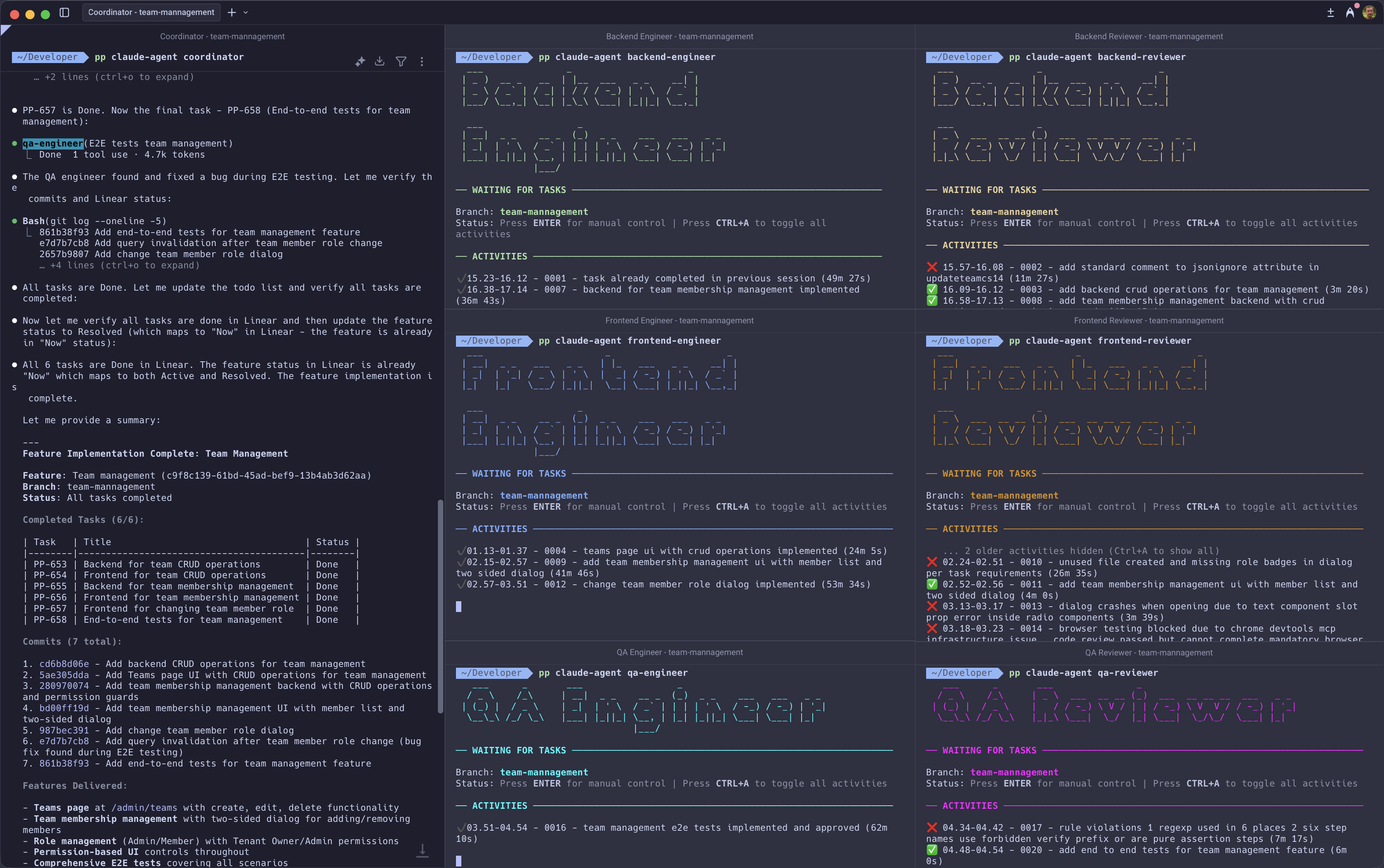
PlatformPlatform includes a multi-agent autonomous development workflow powered by Claude Code. Nine specialized AI agents collaborate to deliver complete features, from requirements to production-ready code, while enforcing enterprise-grade quality standards.
Zero-tolerance code reviews: AI agents follow rules well until they hit problems, then cut corners, which is why many struggle to get AI to write production-ready code. Dedicated reviewer agents catch this. They reject any code that can objectively be made better: compiler warnings, static analysis errors, browser console warnings, or deviation from established patterns. All warnings including warnings in seemingly unrelated parts of the system are fixed. This boy scout rule approach ensures every commit meets production standards.
Interactive sessions with full visibility: Each agent runs in an interactive Claude Code session. You can watch their work in real-time, intervene to guide decisions, or let them run autonomously. Unlike normal Claude Code agents that work in the background like a black box, you're always in control.
Persistent memory across interactions: Agents maintain context between delegations. When an engineer requests a follow-up review, the same reviewer continues with full knowledge of prior feedback. No re-explaining needed.
Cross-team collaboration: Agents can communicate directly. If the frontend engineer needs a backend API change, they ask the backend engineer, wait for implementation and review approval, then continue their work automatically. All work is locally on the same branch, but each agent only changes, reviews, and commits code within their area of expertise.
No context window exhaustion: Traditional AI agents must clear or compact their context as conversations grow, forgetting important details. With specialized agents for each domain, no single agent accumulates context bloat. The frontend engineer doesn't need backend implementation details. The system ensures that every new task starts with a fresh context window, but agents always read the feature description first to maintain the big picture.
Self-healing orchestration: The developer-cli hosts each agent process. If an agent stops for whatever reason, the worker-host detects it and recovers automatically. E.g. if an agent forgets to signal completion, they hit Claude Code session rate limit, the server needs to be restarted, or database migrations are needed. The system will try to self-heal and continue until the feature is complete.
Automatic problem reporting: When agents encounter unclear situations (duplicate tasks, missing tools), they file problem reports. The pair-programmer agent can analyze these reports and fix workflow issues.
Standard product management tool integration: Works with Linear, Azure DevOps, Jira, GitHub, or markdown files in the local filesystem. Tasks flow through statuses (planned → active → review → completed) with full audit trail. Adjust tasks mid-flight or restart features entirely if the first attempt misses the mark.
- tech-lead: Interviews you with targeted multiple-choice questions to rapidly gather requirements, researches codebase patterns, and creates a PRD with implementable tasks
- coordinator: Maintains the big picture across hour-long implementation sessions, ensuring engineers work structured and stay aligned with feature goals
- backend-engineer, frontend-engineer, qa-engineer: Implement code within their specialty
- backend-reviewer, frontend-reviewer, qa-reviewer: Zero-tolerance gatekeepers who reject any deviation from established standards, then commit approved code
This workflow requires Claude Code and will not work with other AI coding assistants.
git checkout -b feature-namepp claude-agent tech-leadRun the /process:create-prd slash command. The tech-lead will guide you through a brief interview to understand what you want to build, then generate a complete feature specification with tasks in your product management tool (Linear, Azure DevOps, Jira, GitHub, or markdown files).
Open seven terminal windows and start each agent:
pp claude-agent coordinator
pp claude-agent backend-engineer
pp claude-agent frontend-engineer
pp claude-agent backend-reviewer
pp claude-agent frontend-reviewer
pp claude-agent qa-engineer
pp claude-agent qa-reviewerTell the coordinator which feature to implement by providing the title or ID of the feature created with the tech-lead. From here, the agents take over.
The coordinator breaks down the feature into tasks and delegates them to engineers. Each engineer claims their task, studies the requirements, and builds according to project rules and guidelines - writing tests, running migrations, restarting servers, and handling all the details. When implementation is complete, reviewers scrutinize every change and only approve code that meets production standards.
The entire process can take several hours depending on complexity, but at the end you get a fully implemented feature: backend logic, database migrations, API endpoints, frontend UI, localization, and end-to-end tests. All committed. All tests passing. Ready to ship.
PlatformPlatform is a monorepo containing all application code, infrastructure, tools, libraries, documentation, etc. A monorepo is a powerful way to organize a codebase, used by Google, Facebook, Uber, Microsoft, etc.
.
├─ .agent                # Google Antigravity AI rules and workflows (synchronized from .claude)
├─ .claude               # Claude Code AI rules, commands, and samples (base for all AI editors)
│  ├─ agents            # Claude Code agent definitions for Task tool subagents
│  ├─ agentic-workflow  # Agentic workflow with system prompts and MCP configs (Claude Code only)
│  ├─ commands          # Slash commands and workflows
│  ├─ hooks             # Claude Code hooks to enforce MCP tool usage and prevent dangerous git operations
│  └─ rules             # AI rules for code generation patterns
├─ .cursor               # Cursor AI rules and workflows (synchronized from .claude)
├─ .github               # GitHub configuration, CI/CD, and GitHub Copilot AI rules and workflows
├─ .windsurf             # Windsurf AI rules and workflows (synchronized from .claude)
├─ application           # Contains the application source code
│  ├─ AppHost            # Aspire project starting app and all dependencies in Docker
│  ├─ AppGateway         # Main entry point for the app using YARP as a reverse proxy
│  ├─ account-management # Self-contained system with account sign-up, user management, etc.
│  │   ├─ WebApp         # React SPA frontend using TypeScript and React Aria Components
│  │   ├─ Api            # Presentation layer exposing the API to WebApp or other clients
│  │   ├─ Core           # Core business logic, application use cases, and infrastructure
│  │   ├─ Workers        # Background workers for long-running tasks and event processing
│  │   └─ Tests          # Tests for the Api, Core, and Workers
│  ├─ back-office        # A self-contained system for operations and support (empty for now)
│  │   ├─ WebApp         # React SPA frontend using TypeScript and React Aria Components
│  │   ├─ Api            # Presentation layer exposing the API to WebApp or other clients
│  │   ├─ Core           # Core business logic, application use cases, and infrastructure
│  │   ├─ Workers        # Background workers for long-running tasks and event processing
│  │   └─ Tests          # Tests for the Api, Core, and Workers
│  ├─ shared-kernel      # Reusable components and default configuration for all systems
│  ├─ shared-webapp      # Reusable and styled React Aria Components that affect all systems
│  └─ [your-scs]         # [Your SCS] Create your SaaS product as a self-contained system
├─ cloud-infrastructure  # Contains Bash and Bicep scripts (IaC) for Azure resources
│  ├─ cluster            # Scale units like production-west-eu, production-east-us, etc.
│  ├─ environment        # Shared resources like App Insights, Container Registry, etc.
│  └─ modules            # Reusable Bicep modules like Container App, SQL Server, etc.
└─ development-cli       # A .NET CLI tool for automating common developer tasks
** A Self-Contained System is a large microservice (or a small monolith) that contains the full stack, including frontend, background jobs, etc. These can be developed, tested, deployed, and scaled in isolation.
The backend is built using the most popular, mature, and commonly used technologies in the .NET ecosystem:
- .NET 10 and C# 14
- Aspire
- YARP
- ASP.NET Minimal API
- Entity Framework
- MediatR
- FluentValidation
- Mapster
- XUnit, FluentAssertions, NSubstitute, and Bogus
- SonarCloud and JetBrains Code style and Cleanup
Read more about the backend architecture
- Vertical Slice Architecture: The codebase is organized around vertical slices, each representing a feature or module, promoting separation of concerns and maintainability.
- Domain-Driven Design (DDD): DDD principles are applied to ensure a clear and expressive domain model.
- Command Query Responsibility Segregation (CQRS): This clearly separates read (query) and write (command) operations, adhering to the single responsibility principle (each action is in a separate command).
- Screaming architecture: The architecture is designed with namespaces (folders) per feature, making the concepts easily visible and expressive, rather than organizing the code by types like models and repositories.
- MediatR pipelines: MediatR pipeline behaviors are used to ensure consistent handling of cross-cutting concerns like validation, unit of work, and handling of domain events.
- Strongly Typed IDs: The codebase uses strongly typed IDs, which are a combination of the entity type and the entity ID. This is even at the outer API layer, and Swagger translates this to the underlying contract. This ensures type safety and consistency across the codebase.
- JetBrains Code style and Cleanup: JetBrains Rider/ReSharper is used for code style and automatic cleanup (configured in
.DotSettings), ensuring consistent code formatting. No need to discuss tabs vs. spaces anymore; Invalid formatting breaks the build. - Monolith prepared for self-contained systems: The codebase is organized into a monolith, but the architecture is prepared for splitting in to self-contained systems. A self-contained system is a large microservice (or a small monolith) that contains the full stack including frontend, background jobs, etc. These can be developed, tested, deployed, and scaled in isolation, making it a good compromise between a large monolith and many small microservices. Unlike the popular backend-for-frontend (BFF) style with one shared frontend, this allows teams to work fully independently.
- Shared Kernel: The codebase uses a shared kernel for all the boilerplate code required to build a clean codebase. The shared kernel ensures consistency between self-contained systems, e.g., enforcing tenant isolation, auditing, tracking, implementation of tactical DDD patterns like aggregate, entities, repository base, ID generation, etc.
Although some features like multi-tenancy are not yet implemented, the current implementation serves as a solid foundation for building business logic without unnecessary boilerplate.
The frontend is built with these technologies:
PlatformPlatform's cloud infrastructure is built using the latest Azure Platform as a Service (PaaS) technologies:
- Azure Container Apps
- Azure SQL
- Azure Blob Storage
- Azure Service Bus
- Azure Key Vault
- Azure Application Insights
- Azure Log Analytics
- Azure Virtual Network
- Azure Managed Identities
- Azure Container Registry
- Azure Communication Services
- Microsoft Defender for Cloud
Read more about this enterprise-grade architecture
- Platform as a Service (PaaS) technologies: Azure is the leading Cloud Service Provider (CSP) when it comes to PaaS technologies. PlatformPlatform uses PaaS technologies which are fully managed by Microsoft, as opposed to Infrastructure as a Service (IaaS) technologies where the customer is responsible for the underlying infrastructure. This means that Microsoft is responsible for the availability of the infrastructure, and you are only responsible for the application and data. This makes it possible for even a small team to run a highly scalable, stable, and secure solution.
- Enterprise-grade security with zero secrets:
- Managed Identities: No secrets are used when Container Apps connect to e.g. Databases, Blob Storage, and Service Bus. The infrastructure uses Managed Identities for all communication with Azure resources, eliminating the need for secrets.
- Federated credentials: Deployment from GitHub to Azure is done using federated credentials, establishing a trust between the GitHub repository and Azure subscription based on the repository's URL, without the need for secrets.
- No secrets expires: Since no secrets are used, there is no need to rotate secrets, and no risk of secrets expiring.
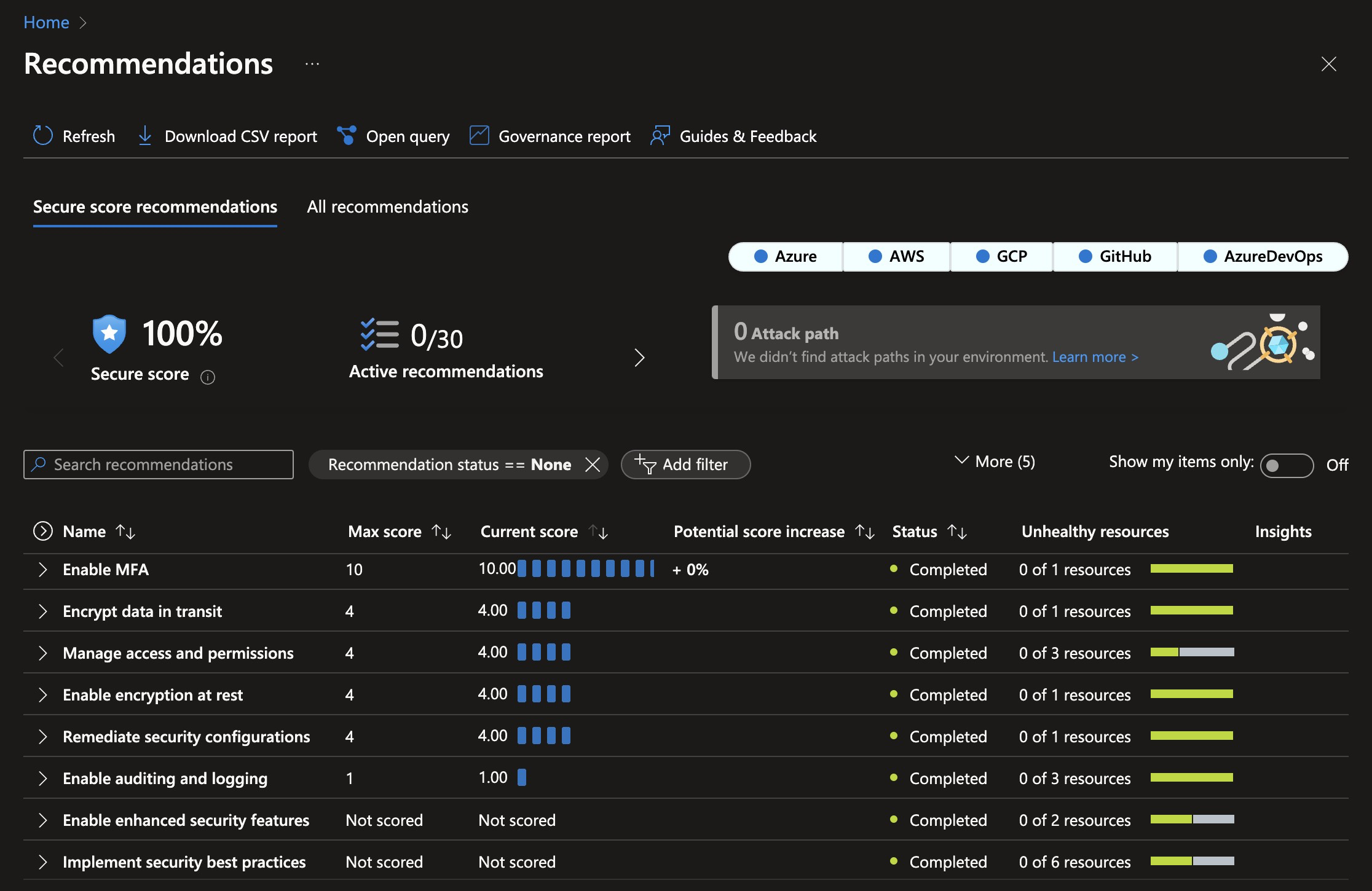
- 100% Security Score: The current infrastructure configuration follows best practices, and the current setup code achieves a 100% Security Score in Microsoft Defender for Cloud. This minimizes the attack surface and protects against even sophisticated attacks.
- Automatic certificate management: The infrastructure is configured to automatically request and renew SSL certificates, eliminating the need for manual certificate management.
- Multiple environments: The setup includes different environments like Development, Staging, and Production, deployed into clearly named resource groups within a single Azure Subscription.
- Multi-region: Spinning up a cluster in a new region is a matter of adding one extra deployment job to the GitHub workflow. This allows customers to select a region where their data is close to the user and local data protection laws like GDPR, CCPA, etc. are followed.
- Azure Container Apps: The application is hosted using Azure Container Apps, which is a new service from Azure that provides a fully managed Kubernetes environment for running containerized applications. You don't need to be a Kubernetes expert to run your application in a scalable and secure environment.
- Scaling from zero to millions of users: The Azure Container App Environment is configured to scale from zero to millions of users, and the infrastructure is configured to scale automatically based on load. This means the starting costs are very low, and the solution can scale to millions of users without any manual intervention. This enables having Development and Staging environments running with very low costs.
- Azure SQL: The database is hosted using Azure SQL Database, which is a fully managed SQL Server instance. SQL Server is known for its high performance, stability, scalability, and security. The server will easily handle millions of users with single-digit millisecond response times.
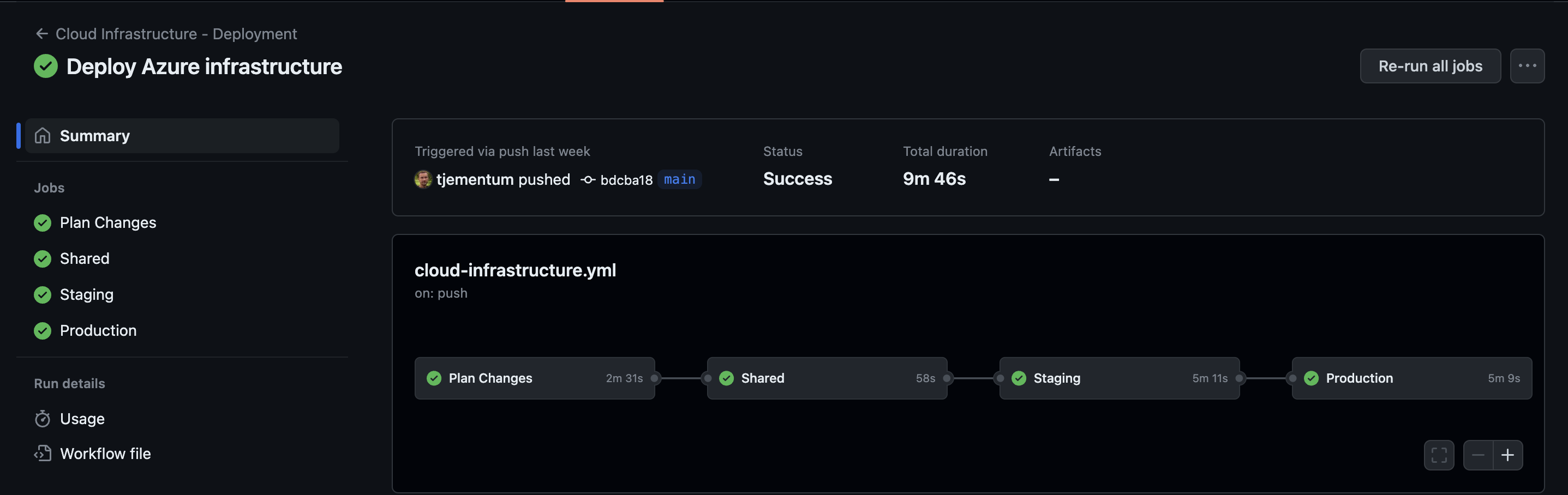
This is how it looks when GitHub workflows has deployed Azure Infrastructure:
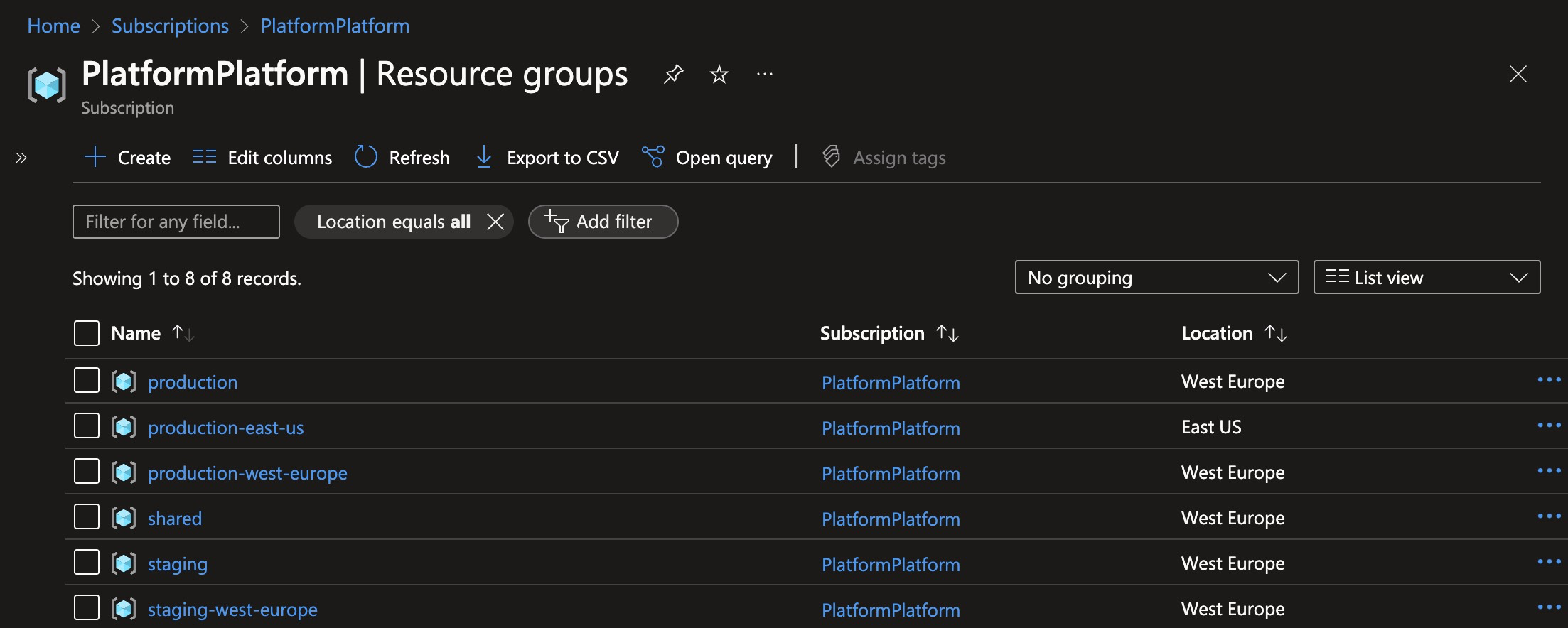
These are the resource groups created when deploying one staging cluster, and two production clusters:
This is the security score after deploying PlatformPlatform resources to Azure. Achieving a 100% security score in Azure Defender for Cloud without exemptions is not trivial.